
September 18, 2026
Stop Overflow in 7 Days: Temporary Package Room for Property Managers
Lean ops first checklist to set up a temporary package room in 7 days. Includes sizing bands, intake to pickup logging, security steps, and a launch audit...
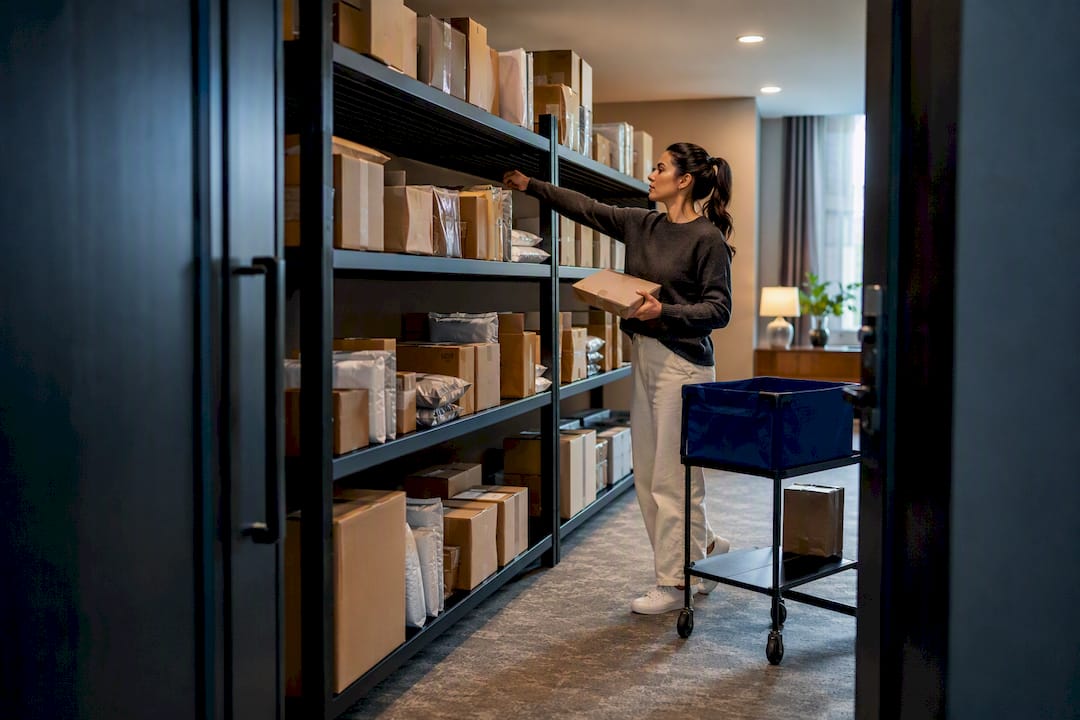
A temporary package room is the right call whenever a property faces overflow, renovation staging, or a seasonal delivery surge and already has the square footage to spare. It beats adding lockers on a rush timeline because it handles oversized items lockers cannot, costs less to stand up, and can go live in days instead of weeks. The sections below cover sizing, access control, intake logging, and the operating rules that keep it from turning into shelves full of mystery boxes.
TL;DR:
- A temporary package room is best for handling oversized packages, quick deployment, and costs less than lockers, especially during short-term surges or renovations.
- Size should be based on peak volume, requiring zones for intake, sorting, oversized items, and potentially refrigerated goods, with measurements guided by last year’s peak delivery data.
- Security relies on ID codes, video verification, and strategic camera placement, with strict discipline in credential management and logging vital for dispute resolution.
- Proper intake documentation must include tracking, shelf location, and photo evidence, with digital logs and proofs such as signatures or photos required at pickup.
- Combining a temporary room with lockers, if available, improves capacity management, while staffing and policies should be set and communicated before opening to enforce proper overflow control.
Table of Contents
- What Is a Temporary Package Room, and When Do You Need One?
- How Big Should Your Temporary Package Room Be?
- Locking Down Access: Security and Monitoring That Actually Work
- Intake and Chain of Custody: The Part Everyone Skips Under Pressure
- Planning for Surge Without Losing Control
- Running It Day to Day: Policies, Staffing, and Enforcement
- When a Hybrid Setup Beats a Room Alone
- What This Actually Costs to Set Up and Run
- Launching in a Week: Your Setup Checklist
- What Postal Solutions Sees on the Ground
- Skip the DIY Setup: What Postal Solutions Handles Instead
- Sources
- FAQ
What Is a Temporary Package Room, and When Do You Need One?
A package room is a dedicated, access-controlled space where carriers drop off parcels and residents pick them up. Unlike lockers, a package room handles any package size and typically costs less to install, which is exactly why “temporary” versions have become the go-to fix for short-term pressure rather than a permanent building feature.
You reach for one in three situations: a holiday surge that overwhelms your normal setup, a renovation that takes your existing package area offline for weeks, or a short-term spike in resident population. In each case, you need speed and flexibility more than a permanent installation.
The tradeoff against lockers comes down to three things. Lockers automate logging and notification but cost significantly more upfront and struggle with anything bigger than a shoebox, a limitation confirmed in NAAHQ’s package management guidance. A temporary room costs less, scales to any box size, and can be staffed or self-serve depending on your labor budget. What it loses is the automatic audit trail, which means you have to build that discipline manually.
Before committing, run through a quick checklist: Do you have 40 or more square feet available near a secure entry point? Can you get reliable staff coverage or resident notification running within a week? Is the surge genuinely temporary, or is this actually a signal you need a permanent upgrade? If the answer to that last question is “permanent,” a temporary room still buys you the runway to plan a real installation without rushing it.
How Big Should Your Temporary Package Room Be?
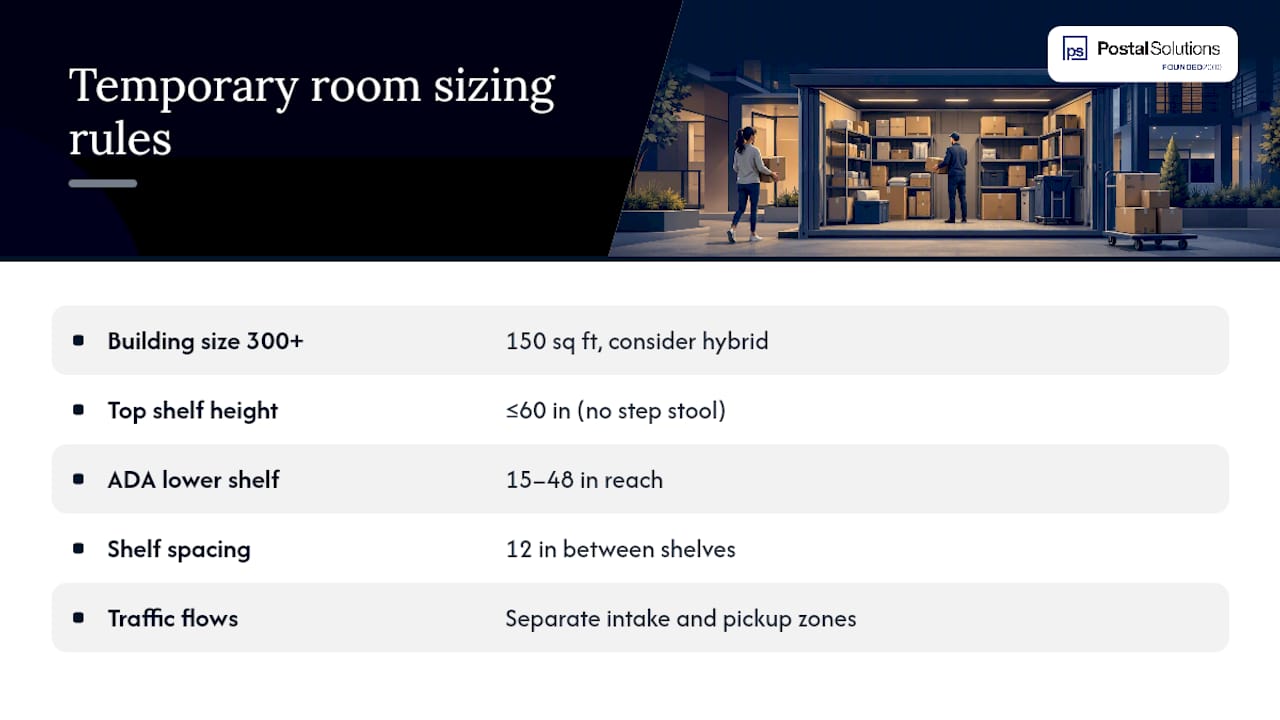
Size for peak volume, not your average delivery day. A room that handles Tuesday just fine will get buried by the week before Christmas if you sized it for typical traffic. Swiftlane’s setup guidance offers square-footage bands by building size that hold up well as a starting point for temporary setups too.
| — | — | Separate intake and pickup traffic flow | | 300+ | 150 sq ft, consider hybrid | Zone for refrigerated or perishable items |
Shelving height matters more than most managers expect. Keep the top shelf at or below 60 inches so it’s reachable without a step stool, and leave at least one lower shelf section within ADA reach range, generally 15 to 48 inches from the floor. Spacing shelves 12 inches apart handles most parcels; anything taller gets floor space in a marked oversized zone rather than forcing a shelf redesign.
Think in zones, not just square footage. You want a clear intake area near the door where carriers drop off without wandering into resident pickup traffic, a staging area for sorting, a marked oversized-item corner for furniture boxes and bulk orders, and, if your community handles meal kits or grocery deliveries, a small refrigerated or insulated zone separate from dry goods. Cramming all of that into one undivided room is how a 100-unit property ends up with a walking path the width of a hallway and boxes stacked against the door.
Pro Tip: Measure your actual peak day from last year’s delivery logs before locking in a size. A single Black Friday week tells you more about real capacity needs than any general square-footage rule.
Locking Down Access: Security and Monitoring That Actually Work
A temporary setup is not an excuse for a temporary security posture. Carriers need a way in that doesn’t involve handing out a master key, and residents need a way to retrieve packages without staff standing there every hour.
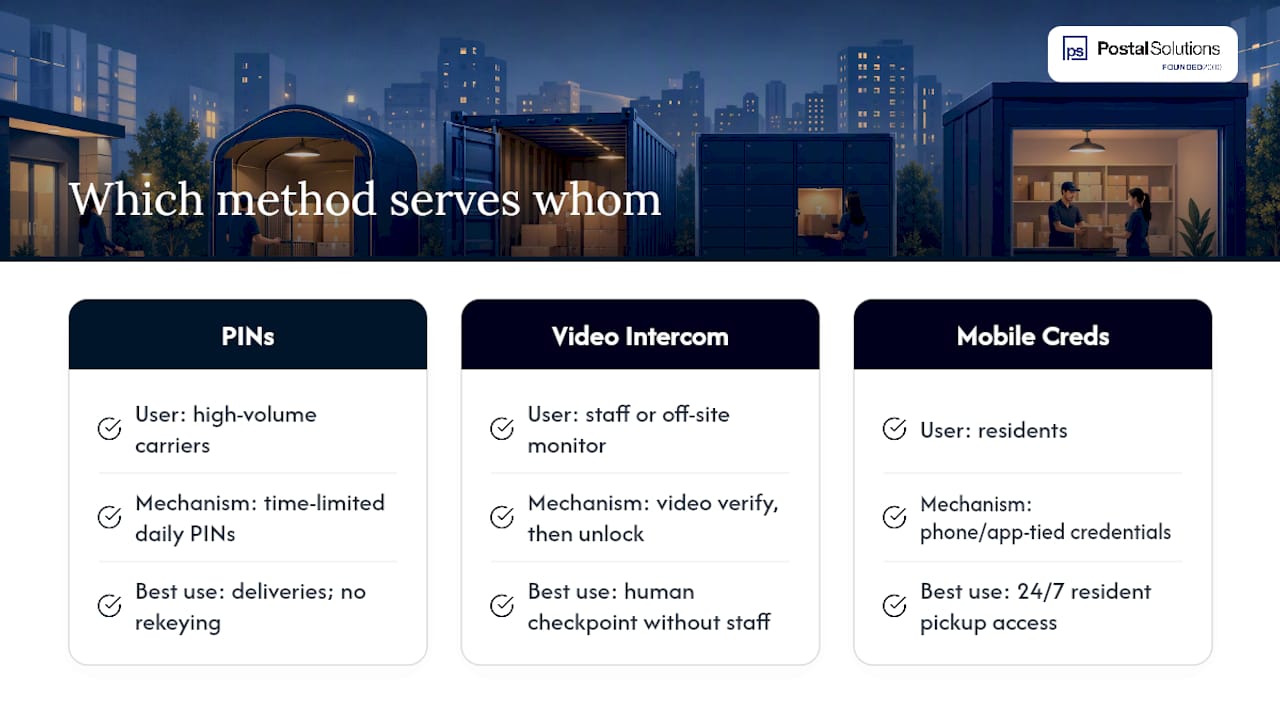
Three access methods cover most situations. Time-limited PINs generated per delivery day work well for high-volume carriers like USPS and UPS, since you can rotate the code without rekeying anything. Video intercom unlock lets a staff member or off-site monitor verify a carrier visually before buzzing them in, which adds a human checkpoint without full-time staffing. Mobile credentials, tied to a resident’s phone or a property app, work best for resident-side pickup access when you want it available around the clock.
Camera placement is where most temporary rooms cut corners, and it’s the wrong place to cut. At minimum, install one exterior camera at the entry door and one interior overview camera positioned to cover the full shelving area, not just the doorway. A camera aimed only at the entrance tells you who walked in. It tells you nothing about what left the shelf ten minutes later.
Credential management doesn’t need to be elaborate, but it needs discipline. Issue PINs or mobile credentials per delivery cycle rather than leaving one code active for the whole surge period. Log every credential issued, to whom, and when it expires. Keep that log even after the temporary room comes down. If a dispute over a missing package surfaces two weeks later, that log is the only thing standing between you and a resident who insists you lost their package.
Intake and Chain of Custody: The Part Everyone Skips Under Pressure
This is where temporary rooms go wrong most often, not because managers don’t know better, but because surge conditions push logging to the bottom of the priority list. That’s backward. The busier the room, the more you need the log.
Best practice calls for six fields at intake: carrier, tracking number, recipient name and unit, arrival date, shelf location, and a photograph of the label. Skip the photo and you’re relying on memory or handwriting when a resident disputes a delivery. Skip the shelf location and your staff spends fifteen minutes per pickup hunting through boxes that all look the same.
You don’t need dedicated software to do this right. A phone camera paired with either a lightweight package-management app or a structured spreadsheet covers most temporary setups. The tool matters less than the discipline of using it every single time, including the box that arrives at 6:45 PM when everyone wants to go home.
For pickup, capture proof before the resident walks out the door:
- A signature, even a simple tap-to-sign on a tablet or phone
- A photo of the resident holding or standing next to the retrieved item
- A timestamp logged automatically alongside the pickup record
- An automated text or email notification sent the moment the package is logged in, not hours later
That notification step does double duty. It gets packages off your shelf faster because residents know the moment something arrives, and it gives you a paper trail showing you notified them, which matters if a hold-window dispute ever comes up.
Planning for Surge Without Losing Control
Reserve two to three days of extra shelf and floor capacity above whatever your sizing table suggests. USPS parcel volume consistently spikes during peak shipping windows, and a room sized for a normal week will hit its ceiling exactly when you can least afford it to.
Staging tactics matter more than raw square footage during a surge. Stack oversized items on the floor in a marked zone rather than forcing them onto shelves designed for standard boxes. Rotate older packages toward the front of shelves so staff aren’t digging through three days of inventory to find one item. If you’re expecting a specific spike, holiday week or a known move-in date, pull temporary folding shelving into the room a few days early rather than scrambling once boxes start stacking on the floor.
When the room itself hits capacity, you need a routing plan before that happens, not during. Secondary staging in an adjacent storage closet, short-term lockers for smaller items if your property has any installed, or prioritized returns to carrier for anything sitting past its hold window all work as pressure valves. The mistake most properties make is treating overflow as a crisis to react to instead of a scenario to plan for in advance.
Carrier communication closes the loop. Let USPS, UPS, FedEx, and Amazon delivery contacts know about temporary access changes, PIN rotations, or drop-off location shifts before the surge starts, not after a driver has already tried the wrong door twice.
Running It Day to Day: Policies, Staffing, and Enforcement
A temporary room without published rules turns into whatever the loudest resident decides it should be. Staffing models range from a rotating leasing-team member checking in twice daily to a dedicated attendant during peak hours, and the right choice depends on volume more than building size. A 60-unit property handling a two-week holiday surge might get by with staff checking the room twice a day. A 300-unit lease-up in August probably needs someone dedicated to it for a few hours daily.
Publish these policies before you open the room, not after the first complaint:
- Hold-window length, commonly three to fourteen days before a package gets returned to carrier
- Proof required at pickup (signature, ID check, or both)
- Rules for oversized items, including whether residents must schedule pickup in advance
- What happens to packages left past the hold window, stated plainly, not implied
Enforcement is the piece that actually prevents chronic overflow. A published hold window that nobody enforces is just a suggestion, and suggestions don’t stop shelves from filling up permanently. Operators who treat overflow as a procedural discipline, fast intake, findable storage, verified pickup, and enforced returns, avoid the slow creep where “temporary” room becomes permanent storage for packages nobody claims.
Pro Tip: Send the hold-window policy in the same text or email that announces the room’s opening. Residents who know the rule on day one complain far less than residents who discover it when their three-week-old package gets returned to the carrier.
Train staff on the notification system, the log, and where the line sits between “help a resident find their package” and “dig through forty boxes because nobody wrote down a shelf number.” A ready-to-adopt policy template gives you language to publish instead of drafting rules from scratch under time pressure.
When a Hybrid Setup Beats a Room Alone
Hybrid setups, combining a temporary room with existing lockers, often make sense for larger properties with substantial parcel traffic and occasional oversized surges. Room-plus-locker combinations scale better for larger communities because lockers absorb the routine, one-box-per-resident traffic while the room handles anything a locker compartment can’t fit: furniture, bulk grocery orders, or refrigerated items.
The physical layout that works best keeps lockers near the main entry for quick self-serve grabs, with the room positioned as the overflow and oversized destination just beyond it. Signage should point residents to check the locker first, then the room if their notification says otherwise. On the software side, route both systems into the same notification channel so residents get one consistent text or email regardless of where their package landed, and keep a single combined log so staff aren’t cross-referencing two separate systems during a dispute. If your property already runs lockers, check how they integrate with an on-site room setup before adding a second, disconnected system.
What This Actually Costs to Set Up and Run
Basic access control, a keypad or PIN system without video, typically runs in the low hundreds of dollars in hardware. Add video intercom unlock and you’re looking at a meaningfully higher upfront cost, though it buys you a visual verification layer that a PIN alone can’t provide. Package-tracking or notification software subscriptions add a recurring monthly line item on top of hardware.
Labor is the number that surprises most first-time budgeters. A part-time attendant covering peak hours during a two-week surge costs far less than most managers assume relative to the resident-hours lost to lost-package complaints and search time. Some properties offset that labor cost entirely by structuring the service as a resident amenity fee, which turns a cost center into a break-even or even margin-positive line item.
The budget decision comes down to duration and volume. If the surge is genuinely temporary, two to four weeks, invest in the room and skip locker capital costs entirely. If you’re seeing the same overflow pattern every quarter, that’s a signal to improve permanent room operations or add lockers rather than reinventing a temporary fix every season.
Launching in a Week: Your Setup Checklist
- Confirm the space. Verify power, internet access for any notification software, ADA-compliant shelf reach, and clear signage placement.
- Lock in access control. Choose PIN, video intercom, or mobile credentials, and get carrier-facing instructions ready before day one.
- Set up minimal hardware and software. A camera at the door, an overview camera on shelving, and either a package-tracking app or a structured spreadsheet.
- Notify carriers. Send updated drop-off instructions to USPS, UPS, FedEx, and Amazon delivery contacts at least three days before opening.
- Notify residents. Announce the room, hold-window policy, and pickup process by text and email the same week it opens.
- Train staff. Walk through intake logging, photo capture, and pickup verification with anyone covering the room.
- Run a 7-day audit. Check the log against physical shelf contents to catch gaps before they become disputes.
What Postal Solutions Sees on the Ground
Unmanaged temporary rooms fail in predictable ways: no shelf-location logging, no photo at intake, and a hold window nobody enforces until the shelves are full. A dedicated on-site Package Manager fixes this by treating intake discipline as a daily job, not an afterthought during a surge, which keeps disputes down and frees leasing staff to actually lease.
— Postal Solutions
Skip the DIY Setup: What Postal Solutions Handles Instead
Running a temporary package room yourself means someone on your leasing team is now doing intake logging, shelf audits, and pickup verification on top of their actual job. Postal Solutions removes that entirely: a dedicated on-site Package Manager handles daily acceptance, sorting, weekly audits, and resident text and email notifications, working with whatever room or locker setup you already have, so your staff gets back to leasing and renewals instead of chasing missing boxes.
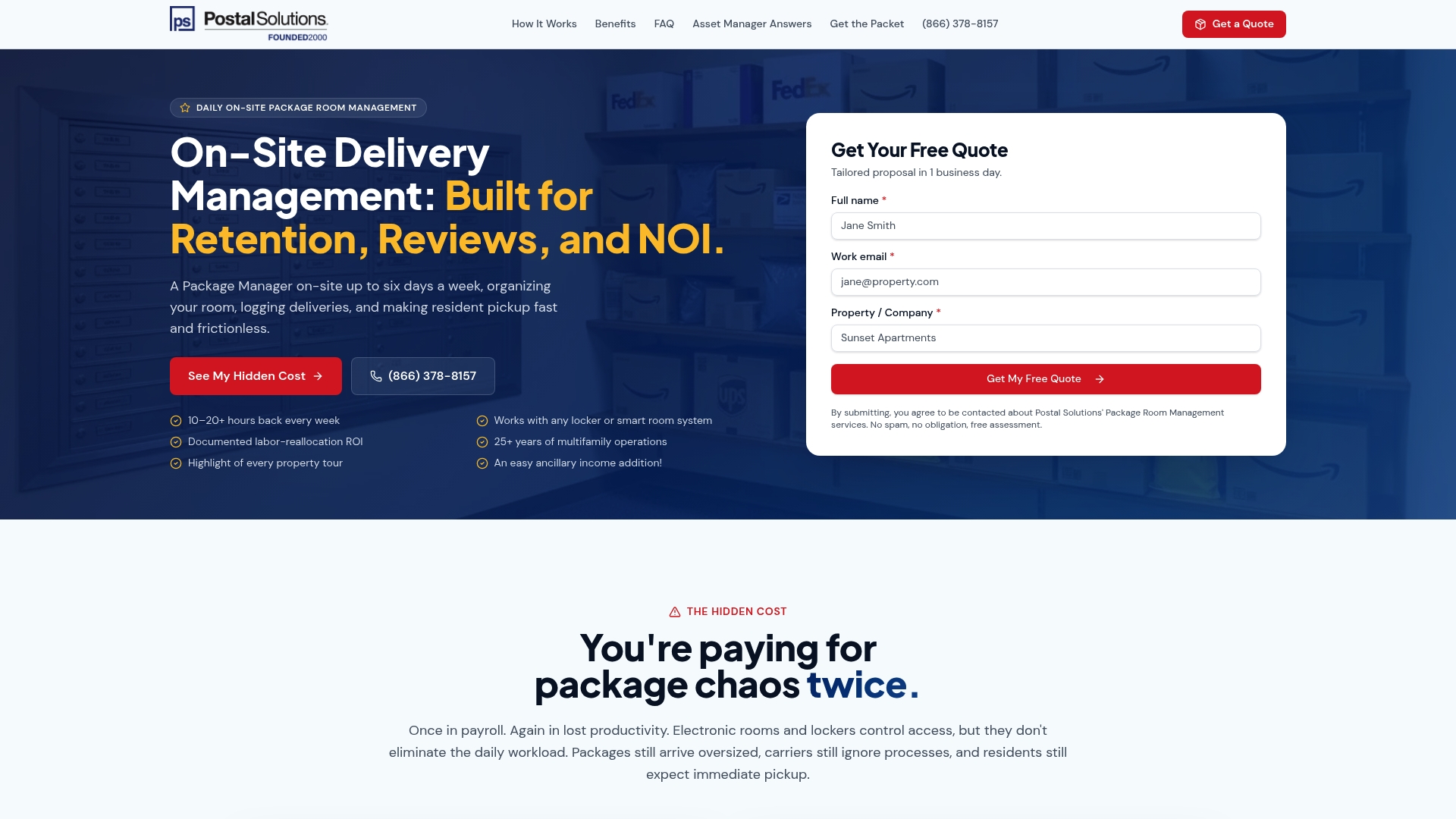
The service can also flip your package operation from a cost center into revenue. Many communities structure it as a paid resident amenity, priced between $5 and $15 per month, and keep the margin over what management costs. If your property already runs lockers, Postal Solutions integrates with systems like Luxer One and works just as well with no locker system at all. Get a tailored labor-cost quote or grab the free package-room setup guide before your next surge hits.
Sources
For sizing and setup mechanics, Swiftlane’s package room guide covers square-footage bands in detail. For intake discipline, Scaalr’s chain-of-custody breakdown explains the six-field logging standard. For locker tradeoffs, NAAHQ’s industry guidance lays out cost and capacity limits. For volume trends, USPS’s shipping data shows why peak-season planning matters.
- How To Set Up A Package Room In 2026 | Swiftlane
- Package Management in Multifamily Buildings: Label to Pickup | Scaalr
- NAAHQ package management guidance (industry best practices)
- USPS facts
FAQ
What does “package room” mean?
A package room is a secured, access-controlled space where carriers deliver parcels and residents retrieve them, distinct from individual lockers because it can hold any size item, including oversized or bulk deliveries.
What does “parcel room” mean?
“Parcel room” is another name for the same thing as a package room, a shared, monitored storage space for resident deliveries rather than a per-unit locker compartment.
How do apartment package rooms work?
Carriers drop off parcels using a PIN, intercom, or scheduled access window, staff or an on-site Package Manager logs each item with carrier, tracking number, unit, and shelf location, and residents get notified and retrieve their package using a signature or photo verification at pickup.
What is a Luxer One room?
Luxer One is a locker and package-room hardware system multifamily properties use for automated logging and resident notifications; Postal Solutions integrates with Luxer One installations to add on-site staffing and audit support on top of the hardware.
How much does a temporary package room cost to set up?
Basic PIN access runs in the low hundreds of dollars, while adding video intercom and software subscriptions raises that meaningfully; labor for staffing during a surge period is typically the larger ongoing cost, which is why some properties offset it through a resident amenity fee.
Recommended
Ready when you are
Fix your package room — start with a free proposal
Daily on-site Package Manager, resident text & email pings*, and a tour-ready amenity. Tell us your unit count and we'll send a right-sized proposal — usually within one business day.
- ✓ 16–30 hours back every week
- ✓ Works with any locker system
- ✓ Faster, friction-free resident pickup
- ✓ An easy ancillary income addition