
September 14, 2026
Five SOPs Property Managers Need for Package Room Training
Practitioner first package room training for property managers: five ready SOPs, a carrier flyer, access control, and a 30 day rollout.
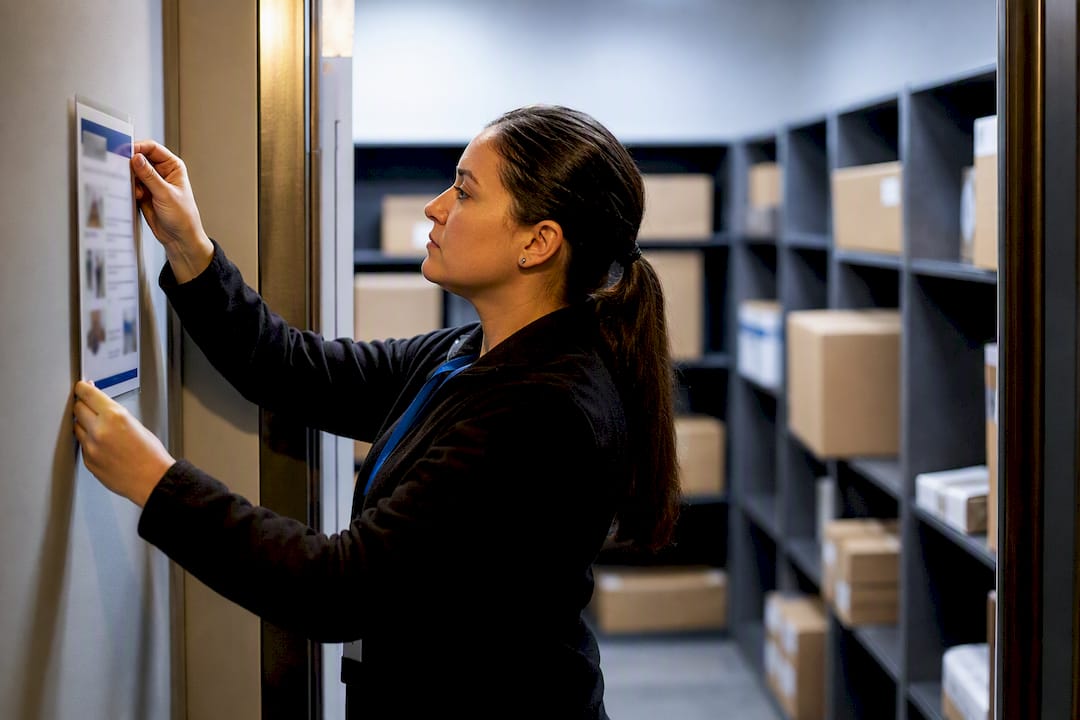
A working package room training program needs five fixed pieces: a staff SOP covering intake and logging, a pictorial carrier SOP posted at the delivery point, defined access control, a weekly audit checklist, and a chain-of-custody log tying every parcel to a name and timestamp. Your mailroom coordinator or regional ops lead runs the first session. The move to make today: print the pictorial SOP, tape it up at the delivery door, and run a one-hour staff drill soon.
TL;DR:
- A comprehensive package room training program requires standardized SOPs, pictorial carrier instructions, access controls, and regular audits to ensure consistency and accountability.
- Posting clear signage at delivery points, front desks, and resident areas, with accessible language and legal compliance, helps reinforce procedures and improve compliance.
- Implementing technology like scanners and PIN codes reduces processing time, but manual logging remains essential for exceptions and accuracy.
- Regularly reviewing KPIs such as parcel volume, dwell time, and complaint rates, along with practical shadow audits, confirms that training effectively improves operations.
- Outsourcing package management services can offload staff workload, providing professionally managed intake, logging, and resident notifications, especially during peak surges.
Table of Contents
- What Should Package Room Staff Training Cover?
- How Do You Train Carriers to Follow Package Room SOPs?
- SOPs and Signage: What to Post and Where
- How Does Package Intake and Logging Actually Work?
- Locking Down Access: Security Practices That Actually Hold Up
- How Do You Prepare Staff for Holiday and Move-In Surges?
- What KPIs Prove Your Training Program Is Working?
- Who Runs the Package Room and How Often Should They Train?
- Launching Package Room Training at a New or Existing Property
- Why This Works: An Operator’s View on Training That Sticks
- What Happens to Packages During a Fire or Evacuation?
- How Do You Know If Package Room Training Is Actually Working?
- What’s the Protocol for Damaged or Lost Packages?
- Training Staff on Package Tracking Software and Tools
- The First 30 Days After a Trained Rollout
- How Postal Solutions Handles Package Room Training for You
- Sources
- FAQ
What Should Package Room Staff Training Cover?
Package room staff training works best broken into modules a new hire can learn in a single shift and a veteran can revisit after a bad week. Vague “use your best judgment” instructions are how packages get lost and residents get angry.
- Intake and sorting. Every parcel gets checked against a delivery manifest or scan the moment it crosses the threshold. Staff log the carrier, unit number, and any visible damage before the box ever touches a shelf.
- Chain-of-custody logging. Capture carrier identifier, tracking number, unit number, timestamp, and staff initials on every entry, with a photo required for anything oversized or already damaged. This record is what settles a dispute in your favor when a resident swears a package “never arrived.”
- Resident pickup verification. Staff should have a script: ask for a name and unit, check government ID or a unit-matched app confirmation for high-value items, and log the release time.
- Oversized, perishable, and refrigerated items. These need a separate storage zone, a shorter hold window, and a resident notification that flags urgency instead of blending into the daily digest.
- Cross-training. Every property needs at least two staff members who can run the package room solo, so a single sick day doesn’t stall the whole intake line.
A formal training packet built around these five modules gives new hires a real reference instead of tribal knowledge passed along verbally.
How Do You Train Carriers to Follow Package Room SOPs?
Carriers rotate constantly, and most delivery drivers never see a written instruction until something goes wrong. A verbal explanation to one driver does nothing for the next twelve who show up that week. Pictorial one-pagers posted at the delivery point solve this because they work whether or not staff are even present, and they read faster than text for a driver juggling a scanner and a stack of boxes.
Your carrier flyer needs:
- The access method (door code, buzzer, or staff call button)
- The scan or log step, shown as a simple photo sequence
- Where to stage packages once inside
- A separate visual for oversized or perishable items and where those go instead
Issuing time-limited QR codes or PINs to frequent drivers, from the same carrier or the same regional hub, tightens compliance further because it ties access to an identity instead of a shared code everyone eventually forgets to retire.
Pro Tip: Laminate the carrier flyer and mount it at eye level right at the door. A sign taped inside a locked package room helps nobody standing outside it.
For a portfolio with multiple properties, centralize the carrier package so every site uses the same one-pager and the same QR/PIN issuance process. Disparate local versions are exactly how compliance goes uneven across a portfolio.
SOPs and Signage: What to Post and Where
A usable SOP fits on one page and reads like a flowchart, not a memo: receive, log, notify, store, release. Anyone should be able to follow it without a manager standing over their shoulder.
Post SOP materials at four points:
- The delivery entrance (carrier-facing pictorial flyer)
- The front desk (staff quick-reference card)
- Inside the package room (full intake and audit checklist)
- Resident-facing common areas (a simplified pickup guide with hours and ID requirements)
Signage also has to hold up legally and practically. ADA design standards govern the accessibility of signage and physical access points, which means text size, contrast, and mounting height aren’t optional design choices. If your resident base includes non-English speakers, print bilingual versions, since a sign nobody can read is functionally no sign at all. Keep a PDF version of every poster on file so a damaged or missing sign gets replaced the same day, not the same month.
How Does Package Intake and Logging Actually Work?
The intake workflow only has five steps, and skipping any one of them is where audits fall apart later.
- Receive the package from the carrier at the door or designated staging area.
- Scan or photograph it, capturing the tracking number and unit, plus a photo if the box shows any damage or is unusually large.
- Log the entry with carrier ID, timestamp, and staff initials.
- Notify the resident through text or email the same hour.
- Store it in the correct zone, standard shelving for routine parcels, a separate area for oversized or perishable items.
A handheld barcode scanner speeds this up, but a smartphone with a consistent photo protocol works nearly as well for smaller operations. What matters is consistency, not the tool.
Industry analysis on multifamily package handling has found that pairing scanning technology with trained staff cuts manual processing time and gets residents their packages faster than either piece alone, since technology alone doesn’t handle exceptions, a mislabeled box or a damaged corner still needs a human decision.
When a scanner won’t read a label or a carrier skips the scan step entirely, fall back to manual logging immediately rather than setting the package aside “to deal with later.” Later is how packages disappear from the record.
Locking Down Access: Security Practices That Actually Hold Up
Access control decisions determine whether your chain-of-custody log means anything when a resident files a lost-package claim. Three tiers work well together: temporary carrier PINs or QR codes that expire on a schedule, permanent resident credentials tied to their unit, and time-limited access windows for staff covering a shift they don’t normally work.
- Mount cameras at the entry point and at the shelving or locker face, not just the general room, so footage actually shows who touched what.
- Pair every camera angle with a timestamp that matches your logging system, so incident review doesn’t require cross-referencing two different clocks.
- Write a one-page incident response script: who reviews footage, who contacts the resident, and how long the resident has to file a claim.
- Reduce tailgating with a single-entry design and a “one credential, one entry” rule enforced by staff, not just posted as a suggestion.
The National Apartment Association’s package management guidance treats regular audits as the accountability layer that keeps every one of these controls honest. A camera nobody reviews and a PIN system nobody audits are just theater.
How Do You Prepare Staff for Holiday and Move-In Surges?
Run a drill before predictable surges, not after volume already tripled.
- Assign roles for the drill: an intake lead, a runner, a notification sender, and a floater who handles whatever breaks.
- Simulate overflow, walking staff through where extra parcels stage when shelving runs out, whether that’s a secured hallway rack or a temporary tent setup.
- Script resident communications for peak windows, including a template warning residents that pickup may take longer than usual during Prime Day or the December rush.
- Schedule temp runner shifts in advance rather than scrambling once boxes start piling up in the hallway.
Rental housing demand keeps climbing, and Harvard’s Joint Center for Housing Studies points to sustained rental occupancy pressure that translates directly into higher delivery volume at the community level. A property that only trains once a year for its worst week is training for the wrong week.
What KPIs Prove Your Training Program Is Working?
Four numbers tell you almost everything: parcel count, dwell time (packages sitting past 48 hours are a red flag), pickup rate, and complaints per 100 packages processed.
- Run regular audits comparing logged packages against physical shelves, flagging any mismatch immediately; using a robust commercial inspection checklist helps ensure comprehensive audit coverage.
- Check dwell time weekly, not monthly, since a pattern of slow pickup usually traces back to a broken notification step, not resident apathy.
- Turn every audit gap into a specific retraining task assigned to a specific staff member, not a general reminder email.
- Send regional ops a short weekly report: parcel volume, dwell time average, complaint count, and any incident flags.
Audit findings that never turn into retraining are just paperwork.
Who Runs the Package Room and How Often Should They Train?
Every site needs a primary coordinator, a trained backup, a runner for high-volume days, and a named escalation owner for disputes or theft claims. Training cadence should follow onboarding, a 30-day check-in, a quarterly refresh, and a dedicated drill before each known peak season. Build a cross-training checklist with handover notes so a backup isn’t guessing at password or access details. Certify a staff member “package-room proficient” only after they’ve completed a full audit cycle without a logging error.
Launching Package Room Training at a New or Existing Property
- Pre-launch week: confirm carrier outreach, mount signage, test scanners or lockers, and run the staff drill.
- Resident communication: send a launch email, a short how-to video, and post lobby signage with a QR demo.
- First week: staff extra hours if possible, use the incident script for any hiccups, and log resident feedback daily.
- Iterate: update the SOP within two weeks based on whatever broke in week one, not six months later.
Why This Works: An Operator’s View on Training That Sticks
Daily on-site management paired with weekly audits keeps chain-of-custody records accurate instead of aspirational. Most failures we see trace back to two things: carriers ignoring instructions because nobody posted any, and inconsistent signage across a portfolio. Standardized SOPs fix both. Technology handles routine scanning, but people still have to make judgment calls on damaged boxes, disputed pickups, and the resident who insists they never got a notification.
What Happens to Packages During a Fire or Evacuation?
Package rooms sit inside the same building your fire and life-safety plan already covers, but most training packets skip the intersection entirely. Staff need one clear rule: during any evacuation alarm, packages get abandoned in place. No one stops to grab a shelf of boxes or finish logging an intake entry mid-alarm.
Build three specific items into your emergency procedure:
Staff working the package room during an active alarm follow the same evacuation route and assembly point as every other employee, and the package room itself should never double as a fire exit obstruction, meaning staging carts and overflow pallets stay clear of any marked path. If the package room includes refrigerated storage, note the shutoff procedure for that unit as part of the evacuation checklist, since a refrigeration unit left running during an extended evacuation is a separate hazard.
After an evacuation, don’t reopen the package room to residents or carriers until building management has cleared the space. Log any packages visibly damaged or displaced during the event, treating that as a standard damage-report entry rather than something exempt from your normal chain-of-custody process. Fold this into your quarterly refresher training so it doesn’t get treated as a one-time onboarding note that fades from memory within a month.
How Do You Know If Package Room Training Is Actually Working?
A training session that ends with a signature on a form tells you nothing about whether anyone retained it. Real evaluation happens through observed behavior, not a quiz score.
Run a practical check within the first week: shadow the new staff member through a real intake cycle and score them against the SOP checklist directly, not from memory. Follow that with a 30-day audit comparing their logged entries against the standard fields (carrier ID, tracking number, unit, timestamp, initials, photo where required). Gaps at 30 days point to a specific retraining need rather than a vague “needs more practice” note.
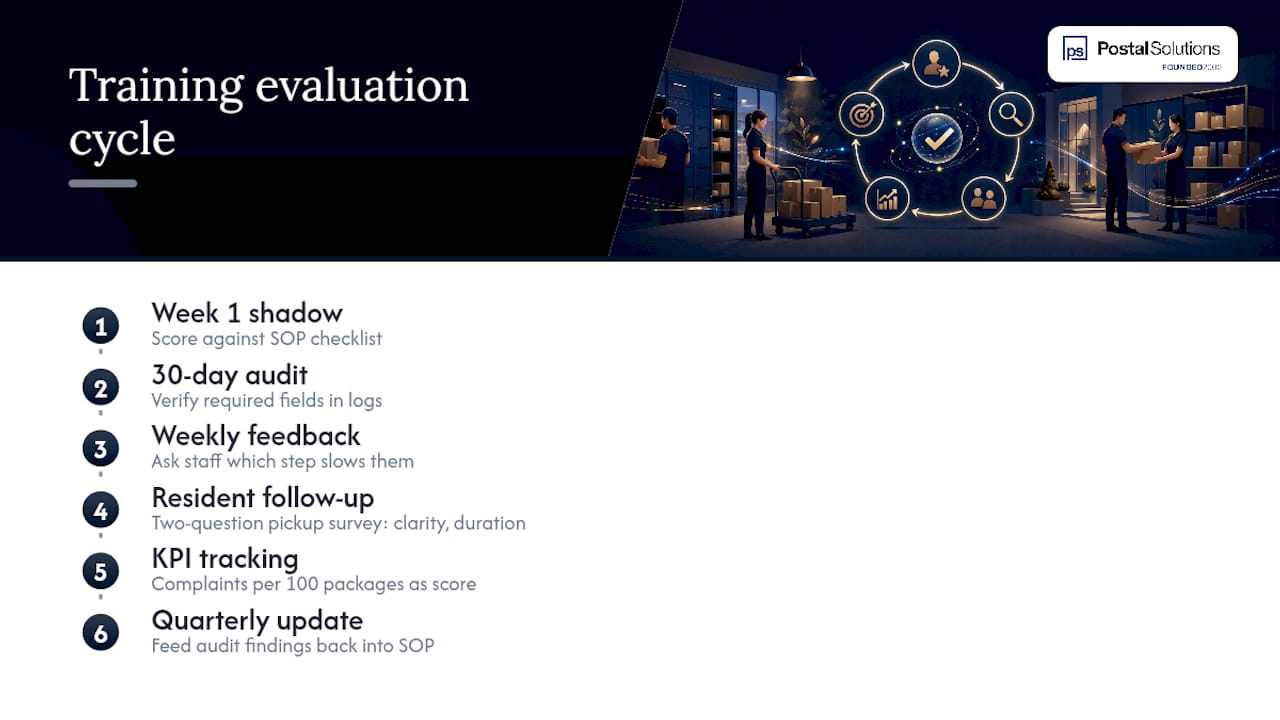
Build a short feedback loop into the weekly audit itself. Ask staff which step slows them down most, since the answer often reveals a signage problem or a scanner limitation rather than a training gap. Ask residents too, through a two-question follow-up after pickup: was the process clear, and how long did it take. Complaint volume per 100 packages, already part of your KPI tracking, doubles as a rolling training-effectiveness score. A spike after a staffing change usually means the newest hire needs another walkthrough, not a written warning.
Treat every audit as a training document, not just a compliance record. Feed findings back into the SOP itself every quarter so the written procedure keeps matching what actually works on the floor.
What’s the Protocol for Damaged or Lost Packages?
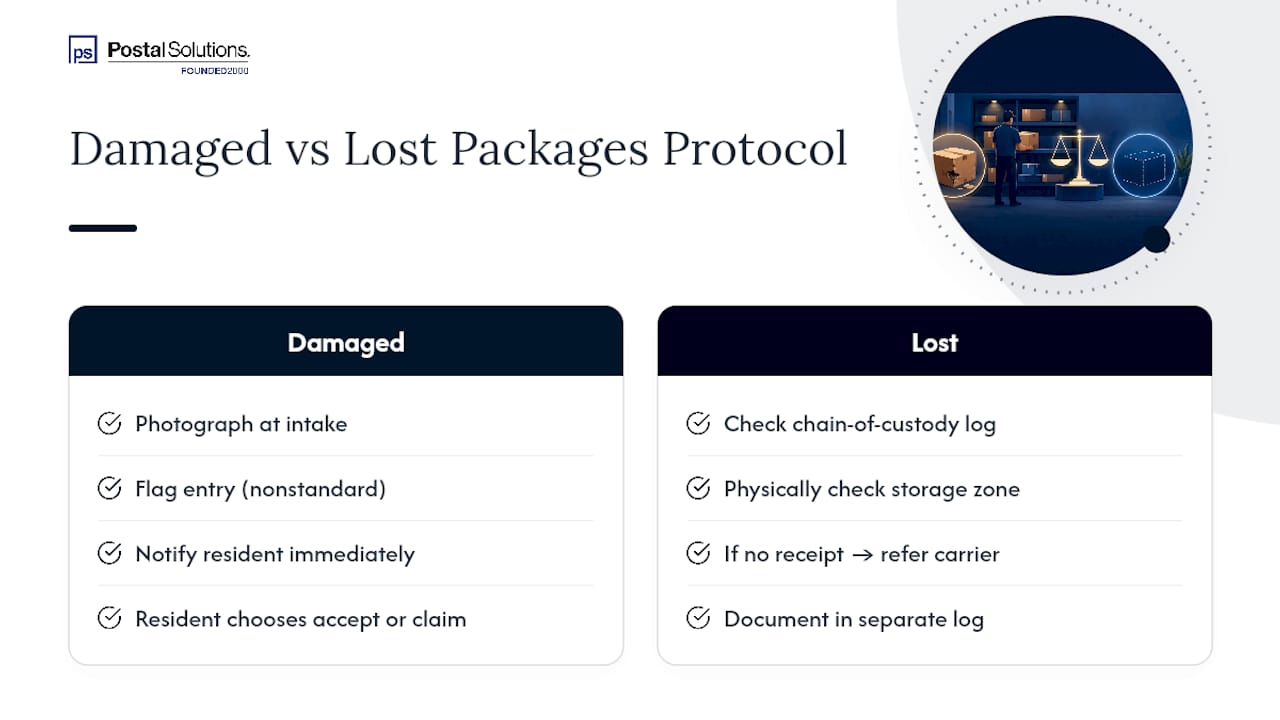
Every training packet needs a damage and loss protocol separate from the standard intake SOP, because these cases involve a resident dispute and sometimes a carrier liability claim.
For damaged packages: photograph the damage at intake, before it ever reaches a shelf, and log it as a flagged entry rather than a standard one. Notify the resident immediately with a note that the item arrived damaged, giving them the choice to accept it as-is or request the carrier initiate a claim. Never quietly deliver a visibly damaged box hoping the resident won’t notice. That decision belongs to the resident, not staff.
For lost packages: check the chain-of-custody log first. If the log shows the item was received and logged but never picked up, check the storage zone physically before telling a resident anything. If the log shows no record of receipt at all, direct the resident to the carrier’s tracking system and their claims process, since a package your log never confirms receiving isn’t something your team can be held responsible for locating.
Document every damage or loss case in a running log separate from routine intake, reviewed weekly alongside your standard audit. Patterns matter here. A single carrier generating repeated damage claims is a conversation with that carrier’s regional dispatcher, not just a resident-service problem to smooth over case by case. Set a resident response deadline, ideally within 24 hours of a reported issue, and hold staff to it the same way you’d hold them to any other SOP timing standard.
Training Staff on Package Tracking Software and Tools
Whatever tracking system your property uses, whether that’s a dedicated package management platform, a locker vendor’s native software, or a basic spreadsheet paired with a smartphone camera, staff need hands-on training before go-live, not a screen-share the morning packages start arriving.
Structure software training in three passes: a guided walkthrough where a trainer demonstrates a full intake-to-pickup cycle, a supervised practice round where the new hire logs real packages with a trainer watching, and an independent shift within the first week where the trainer checks entries after the fact rather than during. This mirrors the same cross-training approach used for the physical intake process, since software fluency and SOP fluency reinforce each other.
Cover the software-specific failure points directly: what happens when the scanner won’t read a label, how to manually override a locker assignment, and how to pull an audit report without calling a regional manager for help. Staff who only know the “happy path” through software freeze the first time something doesn’t scan cleanly, and that’s precisely when a manual fallback log matters most.
If your property integrates a locker system with on-site staff coverage, training needs to address both sides of that handoff explicitly, since a resident who can’t find a package in a locker will come straight to the front desk expecting an answer.
The First 30 Days After a Trained Rollout
Expect fewer resident tickets and faster intake within the first week if training actually landed. A cleaner lobby and shorter lines at pickup hours are the visible signs. By 30 days, your audit numbers should show it too: dwell time trending down, carrier compliance holding steady instead of drifting back to old habits. That drift is the real tell. Carrier compliance isn’t a one-time fix. It needs a periodic check-in, or the pictorial SOP you posted in week one quietly stops getting followed by week twelve.
— Postal Solutions
How Postal Solutions Handles Package Room Training for You
If your team is stretched thin, running staff drills and auditing carrier compliance every week is one more job piled onto leasing. A managed package room service can handle intake, chain-of-custody logging, weekly audits, resident notifications, and overflow storage for oversized or perishable items, relieving your staff from the task of drilling carriers on SOPs every peak season.
This fits properties with thin leasing-office coverage, communities that see sharp holiday or move-in surges, or any team that wants package handling off its plate entirely rather than half-trained internally. Postal Solutions integrates with the locker or package room system you already have, including HelloPackage and Parcel Pending setups, so switching to managed service doesn’t mean ripping out existing hardware. Request a quote to see what daily on-site management would look like for your property’s package volume.
Sources
- National Apartment Association — Package management best practices
- ApartmentList — How to manage package acceptance
- ADA design standards
- Harvard JCHS — six takeaways on America’s rental housing (2024)
FAQ
What Is Included in a Package Room Training Package?
A complete package includes staff SOPs for intake and logging, a chain-of-custody log template, a carrier-facing pictorial SOP, an incident response script, and a weekly audit checklist.
How Do You Build a Package Room Training Program From Scratch?
Start with the five staff modules (intake, logging, pickup verification, special items, cross-training), add a carrier pictorial flyer at the delivery point, post SOP signage at four key locations, and run a one-hour drill before launch.
How Do You Request Training for New or Existing Package Room Staff?
Ask your property’s regional operations lead or mailroom coordinator to schedule onboarding using the standard SOP packet, then follow up with a 30-day proficiency check and a quarterly refresh.
How Often Should Package Room Staff Be Retrained?
Retrain at onboarding, again at 30 days, quarterly after that, and always with a dedicated drill before a known peak like holiday season or move-in.
Can Outsourcing Package Room Management Replace Internal Training?
Yes. Postal Solutions provides on-site Package Managers who handle intake, audits, and notifications directly, removing the need to build and maintain internal training from scratch.
Recommended
Ready when you are
Fix your package room — start with a free proposal
Daily on-site Package Manager, resident text & email pings*, and a tour-ready amenity. Tell us your unit count and we'll send a right-sized proposal — usually within one business day.
- ✓ 16–30 hours back every week
- ✓ Works with any locker system
- ✓ Faster, friction-free resident pickup
- ✓ An easy ancillary income addition