
September 11, 2026
Operator First Package Room Planning for Property Managers
Package room planning for property managers: size for peak volume, set staffing, carrier SOPs, start weekly audits to reduce complaints.
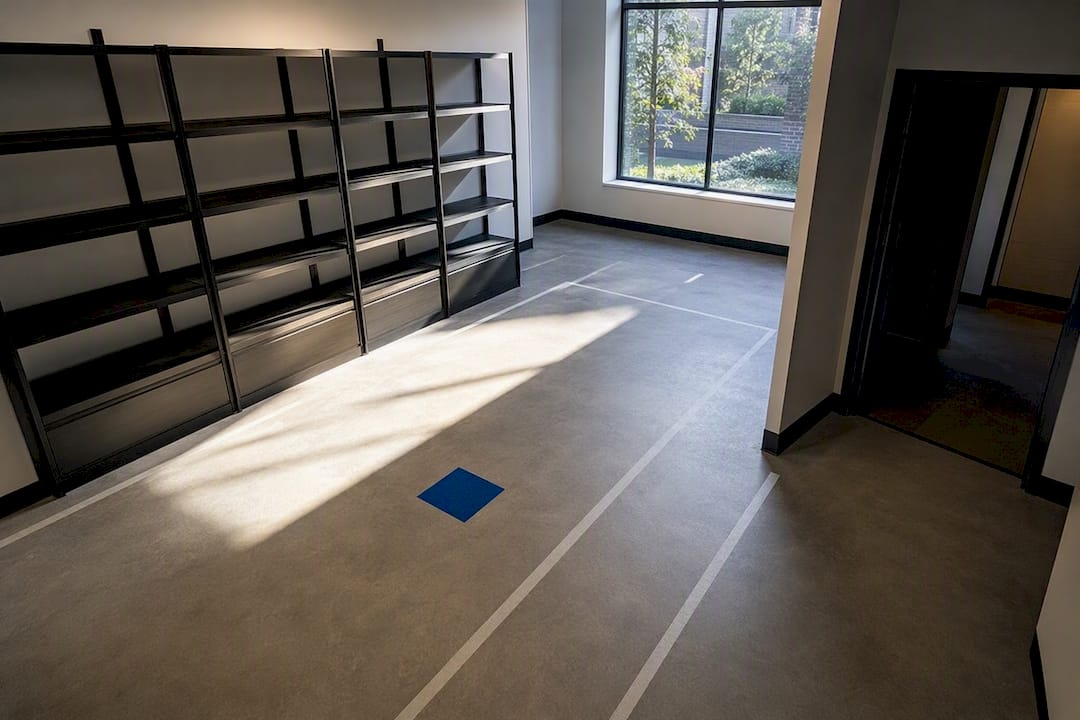
If your property has open space but a tight budget, a package room beats lockers as your starting move. Lock in three things before anything else: size the space for peak volume instead of average, staff it with a clear audit routine, and enforce carrier compliance from day one. Get those right and a hybrid locker addition later becomes a simple upgrade, not a rescue mission.
TL;DR:
- Properties should size the package room based on peak volume, with 1 to 3 square feet of wall space per unit and at least two days of overflow capacity.
- Ensuring a ground-floor, near-lobby location with adequate electrical, network, and clearance for handling large or refrigerated packages minimizes delivery delays and congestion.
- Implementing a clear intake workflow with scanning, logging, and resident notifications reduces carrier errors and improves package traceability.
- Staff training, carrier compliance protocols, and weekly audits are critical to minimizing theft, misrouted packages, and resident complaints effectively.
- For properties over 150 units or with high after-hours demand, a hybrid room and locker setup tends to boost resident satisfaction without full locker system costs.
Table of Contents
- How Do You Assess Your Property’s Package Room Needs?
- Where Should the Package Room Go, and How Should It Flow?
- How Big Should a Package Room Be?
- What Access Control and Monitoring Actually Prevent Theft?
- What Intake Workflow Reduces Carrier Errors?
- Who Should Staff and Audit the Package Room?
- When Do Lockers or Hybrid Setups Make Sense?
- What Does It Cost and How Long Does Setup Take?
- What Managed On-Site Operations Actually Deliver
- One Change to Make in the Next 30 Days
- Get a Package Room Setup Plan Built for Your Property
- Sources
- FAQ
How Do You Assess Your Property’s Package Room Needs?
Start with data, not guesswork. Pull carrier delivery counts from your current mailroom or front desk for 30 days, and separate weekday averages from weekend and holiday spikes. Properties that skip this step almost always undersize their solution, then scramble every December.
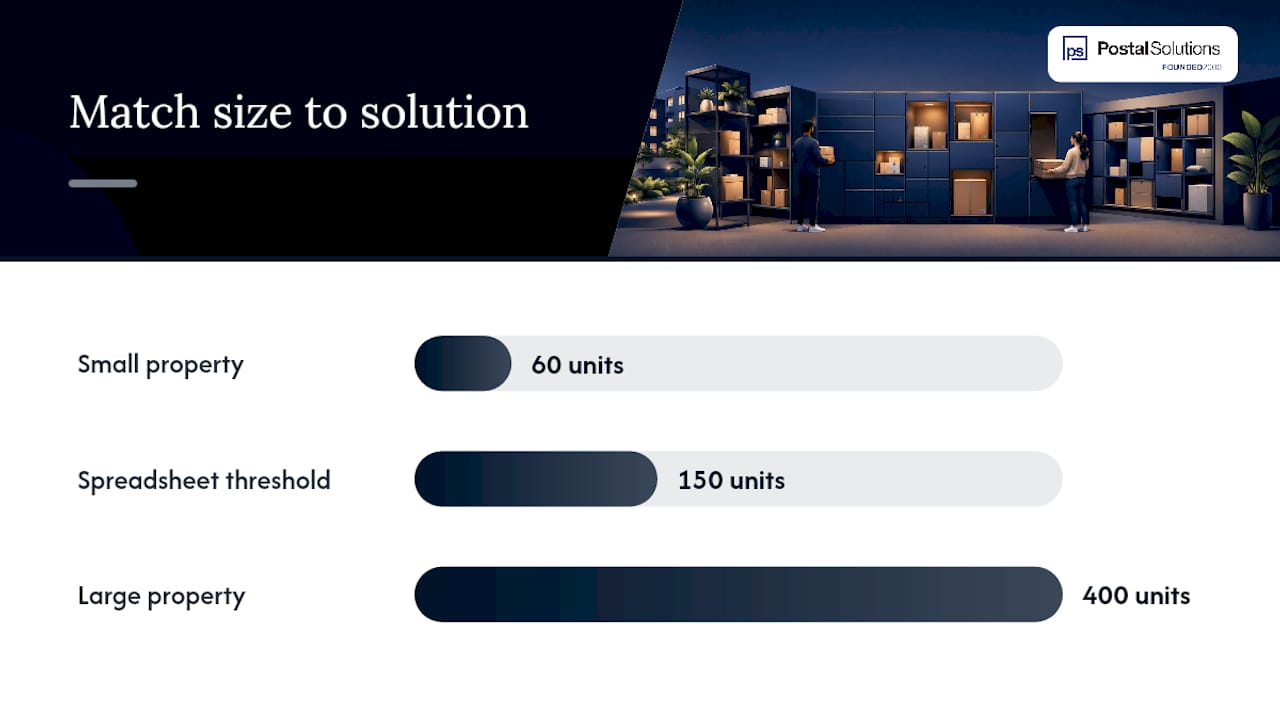
Measure volume with a simple log: date, carrier, package count, and size category (standard, oversized, refrigerated). A spreadsheet works fine for under 150 units. Anything larger benefits from a dedicated intake app or your property management software’s package module.
Walk the property with a tape measure and a checklist before you commit to a room. Look for:
- Ground-floor or near-lobby space with direct carrier access from the main entrance
- Existing electrical outlets and network drops for cameras or smart shelving
- A door wide enough for hand trucks and dolly clearance, at least 36 inches
- Ventilation or climate control if you plan to store perishables
- Sight lines from a front desk or leasing office for informal monitoring
Staffing questions decide more than square footage does. Who’s physically present when FedEx, UPS, and Amazon drivers show up? Is there after-hours coverage, or does everything sit until morning? Who owns the weekly audit, and what happens when that person is on vacation? A framework for matching property type to solution puts staffing at the center of the decision, ahead of hardware specs, and that’s the right order to think in. A 60-unit property with a part-time leasing agent needs a different setup than a 400-unit high-rise with 24-hour concierge coverage, even if their daily package counts look similar on paper.
Where Should the Package Room Go, and How Should It Flow?
Ground-floor placement near the main entrance isn’t a nice-to-have. It’s the difference between a driver who drops 40 packages in five minutes and one who wanders the property looking for an entrance, then leaves boxes on a bench because they gave up. Before you finalize a room, confirm electrical capacity for lighting and cameras, a network drop if you’re adding smart access control, and a door swing that doesn’t block the intake path.
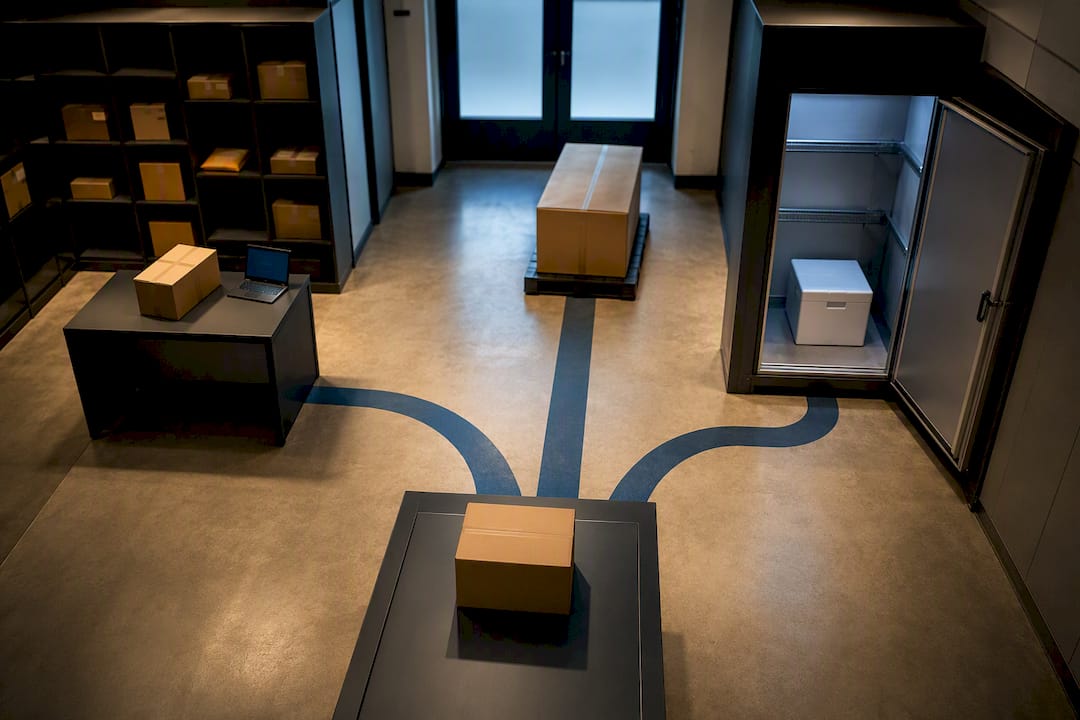
Design the room so a driver walks in, sees shelving immediately, and can scan or log a package without asking staff for directions. That means clear sight lines from the entry point to the shelving units, enough width for a hand truck to pass a person standing at a shelf, and ADA-compliant clearance of at least 32 inches at any pinch point.
Set aside separate zones inside the room:
- An intake staging area near the door for sorting before shelving
- Overflow shelving or floor space rated for two to three days of peak volume
- A refrigerated unit or cooler, if grocery and meal-kit deliveries are common in your resident base
- A marked zone for oversized items like furniture or bikes that don’t fit standard shelving
Pro Tip: Put your camera near the door facing inward, not on the shelving. You want a clear shot of who enters and exits, not a wide shot of boxes that tells you nothing about who touched them.
How Big Should a Package Room Be?
Size for peak, not average. A property that averages 60 packages a day can see 150 or more during the two weeks around the holidays, and undersizing for that window is the single most common planning mistake. The general guideline is 1 to 3 square feet of usable wall area per unit, with larger buildings trending toward the lower end because shelving efficiency improves at scale.
| Property Size | Recommended Room Area | Shelving Approach |
|---|---|---|
| Under 100 units | 100–200 sq ft | Fixed and adjustable metal shelving mix |
| 100–300 units | 200 sq ft | Adjustable shelving with dedicated overflow zone |
| 300+ units | 500 sq ft or hybrid room/locker | Adjustable shelving plus locker bank for after-hours |
Shelf specs matter more than most managers expect. Use adjustable metal shelving with 18 to 24 inches of depth rather than fixed shelving, since package sizes vary wildly and fixed shelves waste vertical space. Set shelf heights around 30, 46, and 60 inches so small and large items both have a natural home.
Two things to plan around explicitly:
- Build in two to three days of peak storage capacity so a single missed pickup day doesn’t cause overflow into hallways.
- If your property runs 100 to 300 units, a hybrid setup, lockers for after-hours and high-value items plus room shelving for overflow and oversized packages. It tends to outperform either option alone.
That hybrid ratio isn’t a fixed formula. It’s a judgment call based on how much after-hours pickup demand you actually see.
What Access Control and Monitoring Actually Prevent Theft?
Credentials matter less than how you manage them. Time-limited PINs that expire after 24 or 48 hours beat permanent codes because a compromised code stops being useful fast. Mobile credentials tied to a resident’s phone add a layer of accountability that a shared PIN never will, since you can see exactly who opened the door and when.
Camera coverage doesn’t need to be elaborate to be effective. One camera covering the entry door and one covering the shelving aisle, with footage retained for at least 30 days, covers the vast majority of disputes. Property managers dealing with more than one theft claim a month usually find the gap isn’t camera count. It’s retention length, footage gets overwritten before anyone reviews it.
Here’s the uncomfortable truth about room-level audit trails: they’re inherently weaker than locker systems, because a room doesn’t log every touch the way a locker’s individual compartment does. Mitigate that with:
- A sign-in log at the door for anyone accessing the room outside resident pickup hours
- Carrier-specific PINs so you can trace which driver dropped a disputed package
- Weekly audits that reconcile logged deliveries against physical shelf counts
Weekly audits and carrier compliance protocols are the two controls that separate functioning systems from ones with recurring loss disputes, more than any single piece of hardware. If your property already runs an access-control system for gates or amenity spaces, prioritize integrating the package room into that same platform rather than running a separate credential system nobody remembers to update.
What Intake Workflow Reduces Carrier Errors?
Carrier non-compliance, drivers skipping scans or bypassing intake steps, is the single leading cause of package system failures, more than any hardware limitation. Fix the workflow before you fix the room.
Require these four steps at every drop-off:
- Scan or log the package against the resident’s unit number
- Place it in the assigned shelf zone matching its size category
- Photograph high-value or oversized items before shelving
- Trigger an automatic resident notification the moment the package is logged
Enforcement is where most properties fall short. A laminated pictorial SOP posted at the intake point, showing exactly where to scan and where to place packages, cuts confusion for new or substitute drivers who’ve never seen your specific setup. Pair it with a QR code or carrier PIN system, and run a five-minute training walkthrough with your regular UPS, FedEx, and Amazon drivers whenever routes change.
Build exception workflows before you need them, not after. What happens when a driver bypasses the scan entirely? What’s the protocol for a package too large for any shelf, or a refrigerated item that arrives when no staff is on-site? Write these down. Pro Tip: Keep a laminated one-page exception guide taped inside the intake room itself. Staff turnover means the person handling tomorrow’s oversized delivery might be someone who’s never seen this room before.
Notification timing directly affects resident complaints. A package sitting unlogged for six hours generates far more frustrated calls than one logged and texted within minutes of arrival, even if pickup happens at the same time either way.
Who Should Staff and Audit the Package Room?
Three staffing models cover most properties: a part-time attendant who checks in twice daily, a dedicated on-site package manager who works the room most weekdays, or an outsourced managed service that handles intake, sorting, and audits without adding a line to your payroll. The right choice depends on volume and how much leasing staff time you’re currently losing to package chaos.
Daily tasks stay consistent regardless of who performs them: label and shelve incoming packages, send resident notifications, and log anything oversized or refrigerated separately. Weekly audits go further, reconciling every logged delivery against physical inventory and flagging discrepancies before they become resident complaints.
Track these KPIs to know if the system is working:
- Dwell time: how long a package sits before pickup, shorter is better
- Delivery failure rate: percentage of packages misrouted, lost, or disputed
- Staff hours saved: leasing team hours no longer spent sorting or searching for packages
- Resident complaints: volume and resolution time for package-related tickets
Weekly audits paired with consistent carrier compliance protocols are what turn these KPIs from aspirational into measurable. Document the before-and-after: if your leasing team was spending six hours a week on package sorting before a dedicated process existed, and that drops to zero after a manager or managed service takes over, that’s a number ownership understands immediately.
When Do Lockers or Hybrid Setups Make Sense?
Pure package rooms work well for smaller properties with reasonable staffing and moderate volume. Once you cross roughly 150 to 200 units, or if after-hours pickup demand is high, a hybrid model, room shelving plus a bank of lockers, usually delivers better resident satisfaction without the full cost of an all-locker system.
Lockers earn their keep for high-value items and after-hours access, since residents can retrieve a package at 11 PM without staff present. Rooms earn their keep for overflow, oversized furniture, bikes, and refrigerated groceries that no locker compartment can hold. The trigger points to watch:
- Rising after-hours pickup requests or complaints about limited access windows
- Consistent overflow beyond your two-to-three-day peak buffer
- A resident survey showing dissatisfaction with pickup hours specifically, not package handling overall
For holiday peaks, most properties don’t need a permanent hardware upgrade. Temporary short-term locker rentals or added part-time staffing for a four-to-six-week window around the holidays often solves the surge without a capital investment that sits underused the other ten months. Smart rooms combining open shelving with computer vision can triple storage density in the same footprint compared to lockers, but that density only pays off if drivers actually follow the scanning workflow, which circles back to carrier training.
Reserve overflow floor space specifically for oversized freight. Trying to wedge a mattress box into a shelving aisle designed for standard parcels creates the exact congestion that turns a five-minute delivery into a ten-minute one.
What Does It Cost and How Long Does Setup Take?
Entry-level package rooms cost meaningfully less to set up than full locker deployments, since you’re primarily investing in shelving, signage, and possibly a camera system rather than individually secured compartments. Locker systems carry higher upfront costs, and premium smart-locker systems with app integration sit at the top of that range.
A realistic project sequence looks like this:
- Audit week: measure volume, walk the space, confirm electrical and network readiness
- Design phase: finalize layout, shelving order, and camera placement
- Wiring and hardware installation: electrical work, network drops, shelving assembly
- Staff and carrier training: SOP posting, driver walkthroughs, staff audit training
- Launch and resident communication: move-in packet updates, signage, first 30-day review
Update your move-in packet and resident handbook before launch, not after residents start asking questions. Schedule a 30-day check on dwell time and complaint volume, a 60-day review of carrier compliance, and a 90-day audit against your original KPI targets.
What Managed On-Site Operations Actually Deliver
Daily on-site package management covers receiving, sorting, shelving, chain-of-custody logging, and resident notifications, handled by someone whose only job that day is running the package operation correctly. [brand_signal: dedicated on-site Package Manager coverage up to six days a week] means the room gets consistent attention instead of whatever’s left over after leasing and maintenance emergencies.
The operational payoff shows up in a few concrete places:
- Leasing staff stop sorting boxes and start focusing on tours, renewals, and resident relationships
- Weekly audits happen on schedule instead of “when someone remembers”
- Resident complaints about missing or delayed packages drop because notifications go out the moment a package is logged
- The package room itself becomes a visible amenity leasing teams can point to on tours
A professionally run, on-site package room becomes proof to prospective residents that daily life here runs smoother than at the property down the street, and for many communities it doubles as an ancillary income opportunity rather than a pure cost center.
The decision trigger for outsourcing versus running the operation in-house usually comes down to one question: does your current staff have the bandwidth to run consistent daily intake and weekly audits without sacrificing leasing or maintenance priorities? If the honest answer is no, a managed service closes that gap without adding a full-time hire to payroll.
One Change to Make in the Next 30 Days
If you do nothing else this quarter, fix your carrier intake SOP and start weekly audits. That single combination, a laminated pictorial guide at the intake point plus a consistent Friday-afternoon reconciliation, addresses the root cause behind most lost-package disputes and resident complaints. It costs almost nothing to implement and shows results within two weeks.
Report the win in numbers ownership cares about: track dwell time and complaint volume for two weeks before the change and four weeks after. A drop from, say, average two-day dwell time to same-day pickup notification is the kind of comparison that gets a line item approved for the next budget cycle. Don’t oversell it as a total fix. Frame it honestly as the first control that makes every later investment, lockers, cameras, a managed service, actually work as intended.
— Postal Solutions
Get a Package Room Setup Plan Built for Your Property
Running the intake, audits, and carrier training described above takes real hours every week, hours most leasing teams don’t have to spare. Package Room Management is the alternative to hiring and training in-house staff from scratch: a dedicated on-site Package Manager works your community up to six days a week, handling receiving, sorting, shelving, and resident notifications so your team gets out of the package business without losing the amenity value residents expect.
The service integrates with whatever package room or locker hardware you already have, so you’re not ripping out existing shelving or access control to make it work. It also folds in weekly audits and carrier compliance protocols as standard practice, not an afterthought your staff squeezes in between move-ins.
Download the free package room planning guide for a detailed checklist version of the sizing and layout steps above, or if your property doesn’t have a locker system at all, see how daily on-site management works without one. Either page gives you a clear next step toward a room that runs itself.
Sources
- How To Set Up A Package Room In 2026 | Swiftlane
- Multifamily Package Management Guide for Operators - Postal Solutions
FAQ
What Does Package Room Mean?
A package room is an access-controlled space where carriers drop off resident deliveries for later pickup, distinct from individual lockers because it handles oversized items lockers can’t accommodate.
What Is a Parcel Room?
“Parcel room” is another term for the same thing as a package room, a shared, secured storage space for incoming deliveries rather than one-package-per-compartment lockers.
How Big Should a Package Room Be?
Plan for roughly 1 to 3 square feet of usable wall area per unit, sized toward peak delivery volume rather than your daily average, with two to three days of buffer capacity built in.
Package Room or Lockers, Which Does My Property Need?
Smaller or budget-limited properties with available space typically start with a room, while properties over 150 to 200 units or with heavy after-hours pickup demand often benefit from a hybrid room-plus-locker setup.
Can I Outsource Package Room Management Instead of Staffing It Myself?
Yes. Managed on-site services like Package Room Management handle daily intake, shelving, notifications, and weekly audits, freeing leasing staff for resident-facing work instead of package sorting.
Recommended
Ready when you are
Fix your package room — start with a free proposal
Daily on-site Package Manager, resident text & email pings*, and a tour-ready amenity. Tell us your unit count and we'll send a right-sized proposal — usually within one business day.
- ✓ 16–30 hours back every week
- ✓ Works with any locker system
- ✓ Faster, friction-free resident pickup
- ✓ An easy ancillary income addition