
August 5, 2026
Text vs Email Notifications: When to Use Each
Discover when to use text vs email notifications. Learn how to choose the right channel for urgent messages or detailed information.

Use SMS for anything time-sensitive. Use email when the message needs to last, carry detail, or reach a large audience cheaply. That one rule covers most decisions.
For the situations where it matters most:
- Emergencies and package arrivals: SMS wins. 92% of SMS messages are read within 5 minutes in property communications benchmarks, making it the only reliable channel when timing is the point.
- Receipts, leases, and onboarding: Email wins. It threads, it searches, it attaches files, and it costs a fraction of a cent per send at scale.
- Anything genuinely important: Use both. Multi-channel automated communication achieves 98–100% confirmed delivery rates compared to 64–71% for single-channel methods, per NARPM and NAA operational benchmarks.
TCPA governs SMS opt-in in the U.S.; CAN-SPAM and FTC guidance cover email. Both channels carry compliance obligations, and neither is optional to ignore.
Table of Contents
- What is an SMS text notification, exactly?
- What makes an email notification different from a text?
- How text and email notifications compare side by side
- Pros and cons of each channel
- When to use text, when to use email, and why
- Costs, deliverability, and technical constraints
- Notification best practices that actually hold up
- How to combine SMS and email in a single workflow
- How Postal Solutions uses SMS and email for package notifications
- Key Takeaways
- Why the channel debate misses the real question
- Useful sources and further reading
- FAQ
What is an SMS text notification, exactly?
An SMS (Short Message Service) notification is a carrier-delivered text message that lands directly on a recipient’s lock screen, no app, no internet connection, and no inbox required. The carrier network routes it, which is why SMS reaches people even when they have poor data coverage.
Standard SMS caps at 160 characters per segment. Messages longer than that split into multiple segments, each billed separately by most SMS platforms. MMS (Multimedia Messaging Service) extends that ceiling and allows images, GIFs, and short video clips, but it costs more per send and not every carrier handles it identically.
The sender ID matters operationally. Shortcodes (5–6 digit numbers like 77453) are high-throughput, carrier-approved paths built for mass sends. Long codes (standard 10-digit numbers) work for lower-volume, conversational messages but face stricter carrier filtering at scale. For property management, a registered shortcode or a 10DLC (10-digit long code) registered with carriers is the practical standard for resident notifications.
Pro Tip: When writing an SMS opt-in prompt for residents, name the specific service they are opting into (“Package arrival and emergency alerts from [Property Name]”). Vague opt-in language increases carrier filtering risk and reduces resident trust.
What makes an email notification different from a text?
An email notification is a message delivered to a recipient’s inbox via SMTP protocol, rendered either as plain text or as HTML with images, buttons, branded layouts, and embedded links. The distinction between HTML and plain-text matters more than most senders realize.

HTML emails support rich formatting, tracked opens, and clickable CTAs, but they are more likely to land in Gmail’s Promotions tab or trigger spam filters. Plain-text emails look like a message from a person, which is exactly why transactional notifications (rent receipts, package confirmations, maintenance updates) often perform better in plain text.
Three other behaviors set email apart from SMS:
- Threading: Email clients group related messages into conversations, which makes a sequence of package notifications easy to review in one place.
- Inbox placement: Gmail, Outlook, and Apple Mail each apply their own filtering logic. A message that clears spam on one client may not on another.
- Searchability and record-keeping: Email is the channel of record. Residents can search “package” and pull up every delivery notification from the past year. SMS does not offer that.
For long-form content, attachments, and anything a resident might need to reference later, email is the right tool.
How text and email notifications compare side by side
The differences between text alerts and email come down to seven practical dimensions. Here is how they stack up:
| Dimension | SMS / Text | |
|---|---|---|
| Immediacy / open time | Read within minutes | Checked periodically; open rates — |
| Persistence / searchability | Not easily searchable; no threading | Fully searchable; threads by subject |
| Message length & format | 160 chars/segment; MMS adds media | Unlimited; HTML, attachments, images |
| Cost model | Per-message (fractions of a cent to ~$0.01+) | Per-send volume tiers; cheaper at scale |
| Deliverability risks | Carrier filtering; shortcode/10DLC registration | Spam filters, Promotions tab, throttling |
| Consent & compliance | TCPA opt-in required; double opt-in recommended | CAN-SPAM/FTC: unsubscribe link required |
| Best for | Emergencies, 2FA, package alerts, reminders | Receipts, onboarding, newsletters, records |
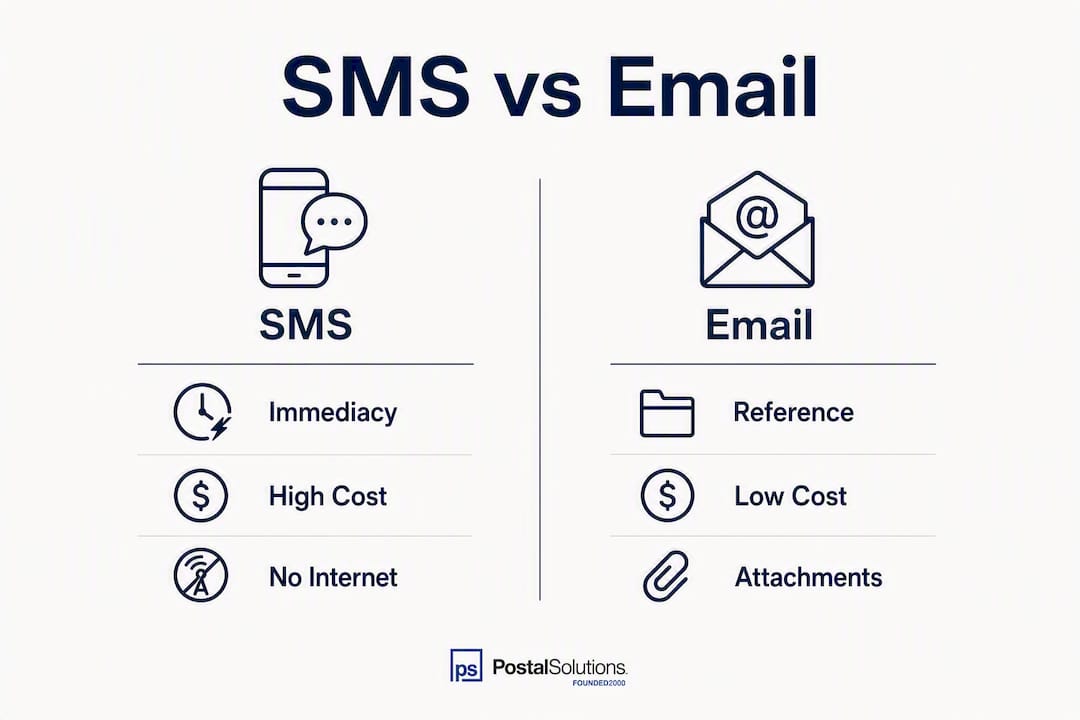
The single most important rule from this comparison: if timing matters, use SMS; if the record matters, use email. For anything where both matter, send both.
Pros and cons of each channel
SMS pros and cons
| Pros | Cons |
|---|---|
| Near-instant read rates | Per-message cost adds up at volume |
| No internet or app needed | 160-character limit per segment |
| High click-through rate | Requires explicit TCPA-compliant opt-in |
| Reaches lock screen directly | Carrier filtering can block bulk sends |
| Works for 2FA and time-sensitive alerts | No native threading or search |
Email pros and cons
| Pros | Cons |
|---|---|
| Low cost at scale | Open rates far lower than SMS |
| Supports attachments and rich formatting | Spam filters and Promotions tab reduce visibility |
| Searchable, threadable record | Not reliable for urgent, time-sensitive messages |
| No per-message fee at most volume tiers | Inbox overload means messages go unread |
| CAN-SPAM compliance is straightforward | HTML rendering varies across clients |
For property management specifically, the cost-per-message trade-off is real. A community with 300 units sending daily SMS alerts will accumulate meaningful per-message costs. Email handles routine, lower-urgency communication at a fraction of that cost. SMS click-through rates are significantly higher than typical email click-through rates, which justifies the premium for high-priority sends like package arrivals and maintenance windows. For a monthly newsletter, that premium is hard to defend.
When to use text, when to use email, and why
The use case determines the channel. Here is how it maps in practice:
Use SMS for:
- Package arrival alerts (“Your package is in the package room — pick up by 8 PM”)
- Emergency notices (water shutoffs, fire alarms, building access issues)
- Two-factor authentication codes
- Same-day appointment or maintenance window reminders
- Rent-due nudges 24–48 hours before the deadline
Use email for:
- Package pickup receipts and chain-of-custody confirmations
- Lease renewals, addenda, and policy updates
- Onboarding sequences for new residents
- Monthly newsletters and community announcements
- Marketing campaigns and promotional offers
Use both for:
- Any message where non-delivery has a real cost (package pickup deadlines, emergency follow-ups)
- Resident onboarding (SMS for the welcome, email for the full packet)
Pro Tip: For package notifications, send the SMS and email simultaneously on arrival. If the package is still unclaimed after 24 hours, send a follow-up email. If it remains after 48 hours, send a second SMS. This sequence respects resident attention while covering the bases operationally.
The NAA’s package management guidance specifically identifies both email and texting as recommended notification methods for package arrival, alongside self-service access-control systems and package lockers.
Costs, deliverability, and technical constraints
Cost structure
SMS pricing runs per message, typically a fraction of a cent to around $0.01 per outbound segment depending on the platform and volume. MMS costs more. Email platforms generally charge by monthly send volume or subscriber count, making them far cheaper per message at scale.
Deliverability risks
Email faces spam filters, Promotions tab routing, inbox overload, and server throttling, all of which can delay or bury a legitimate message. The technical fix is authentication: SPF (Sender Policy Framework), DKIM (DomainKeys Identified Mail), and DMARC (Domain-based Message Authentication) records tell receiving servers that your domain is legitimate. Without all three configured, even well-crafted emails land in spam.
SMS faces carrier filtering, particularly for long codes sending at volume. Registering with 10DLC (for standard long codes) or using a provisioned shortcode reduces filtering risk substantially. Unregistered bulk SMS is increasingly blocked by major U.S. carriers.
Benchmark data
| Metric | SMS | |
|---|---|---|
| Typical open rate | 92% read within 5 minutes (SMS) | Rare |
| Click-through rate | 19–32% | ~2–3% |
| Multi-channel delivery rate | 98–100% (combined) | 64–71% (single channel) |
One practical option for bridging the two channels: keyword-triggered forwarding tools can convert urgent emails into SMS alerts automatically, useful when an existing email workflow needs to reach someone faster than their inbox allows.
Notification best practices that actually hold up
Consent and compliance
- SMS (TCPA): Get explicit written consent before sending any marketing or informational text. Double opt-in (a confirmation reply) is the safest standard. Every message must include an opt-out path (“Reply STOP to unsubscribe”). Violations carry per-message fines.
- Email (CAN-SPAM / FTC): Every commercial email needs a physical mailing address, a clear sender identity, and a working unsubscribe link honored within 10 business days. Transactional emails (receipts, confirmations) have lighter requirements but still need honest subject lines.
Timing and cadence
Send SMS between 8 AM and 8 PM in the recipient’s local time zone. Outside those hours, even a welcome message reads as intrusive. For email, mid-morning sends (9–11 AM) tend to outperform late-afternoon sends, though A/B testing your own list beats any general rule.
Message design
- SMS: one action per message, under 160 characters when possible, and a short link if you need a URL. Keep the sender name visible in the first few words.
- Email: lead with the key point in the subject line, put the CTA above the fold, and use plain text for transactional messages. UTM parameters on every link make attribution clean.
Pro Tip: A/B test subject lines before sending to your full list. A subject line change alone can move open rates by 10–20 percentage points, which matters more than any design tweak.
What to measure: open rate, click-through rate, delivery confirmation rate, and opt-out rate. A rising opt-out rate on SMS is a direct signal that frequency or relevance is off.
How to combine SMS and email in a single workflow
SMS and email are not competing channels. They cover different parts of the same communication job.

Three workflow patterns cover most situations:
1. Simultaneous multi-channel (emergencies) Fire both channels at once. A water shutoff or building emergency cannot wait for someone to check email. SMS reaches the lock screen; email creates the documented record. Both go out at the same moment.
2. Cascading escalation (routine messages) Send email first. If the message goes unread after a defined window (24–48 hours), escalate to SMS. This pattern respects inbox preference while ensuring nothing critical slips through. This is the recommended pattern for routine announcements that carry a deadline.
3. Role-based sequencing (marketing vs. operations) Marketing campaigns start with email (low cost, rich format, easy to unsubscribe). Operational messages (package alerts, maintenance windows) start with SMS. The channel matches the message type, not just the urgency.
Package arrival workflow example:
- Package received and logged → SMS + email sent simultaneously
- No pickup after 24 hours → follow-up email reminder
- No pickup after 48 hours → second SMS reminder
- Package held past policy window → final notice via both channels
To avoid duplicate-notification fatigue, cap SMS reminders at two per package event. Residents who opt out of SMS should still receive email; always maintain a fallback channel.
How Postal Solutions uses SMS and email for package notifications
Multi-channel notifications reduce package clutter and speed resident pickup compared with single-channel approaches, and that tracks with what Postal Solutions sees across the apartment and student housing communities it serves.
When a package arrives at a community managed by Postal Solutions’ On-Site Package Room Management service, the Package Manager logs it into the chain-of-custody system and triggers both an SMS and an email notification to the resident. The SMS gets the immediate attention. The email creates the searchable record the resident can pull up when they arrive at the package room. Both serve a distinct function; neither replaces the other.
Framing the SMS opt-in as a safety and essential-service feature rather than a marketing preference makes a measurable difference. NAA survey data shows opt-in rates at approximately 78% when SMS is positioned as a safety or essential service, compared with significantly lower rates for generic marketing opt-ins.
Pro Tip: When onboarding new residents, present SMS opt-in as part of the package and emergency alert setup, not as a separate marketing preference. Residents who understand the practical value opt in at much higher rates.
For property managers who want a deeper look at how this works operationally, the package notification system guide covers the full workflow from delivery to pickup confirmation.
Key Takeaways
SMS handles urgency; email handles records. Use both for anything where non-delivery has a real operational cost.
| Point | Details |
|---|---|
| SMS for immediacy | 92% of SMS messages are read within 5 minutes, making it the right channel for package alerts and emergencies. |
| Email for records and scale | Email supports attachments, threading, and searchability at a lower per-message cost than SMS. |
| Multi-channel beats single-channel | Multi-channel automated communication achieves 98–100% confirmed delivery rates compared to 64–71% for single-channel methods. |
| Compliance is non-negotiable | TCPA requires explicit opt-in for SMS; CAN-SPAM requires an unsubscribe path for commercial email. |
| Frame SMS opt-in correctly | Positioning SMS as a safety/essential service drives opt-in rates to approximately 78%. |
Why the channel debate misses the real question
Most articles on SMS versus email spend their energy on open rates and click-throughs. Those numbers matter, but they are not the decision. The decision is: what happens if this message does not get through?
For a package sitting in a room that closes at 8 PM, a missed notification is a missed pickup, a resident complaint, and a staff hour spent on follow-up. For a lease renewal, a missed email is a problem that surfaces weeks later. The channel choice should be driven by the cost of non-delivery, not by which metric looks better in a benchmark report.
The property teams that handle this well are not the ones who picked SMS over email or vice versa. They are the ones who mapped each message type to the right channel and built a workflow that covers both. That is what Postal Solutions’ On-Site Package Room Management is built around: a system where the notification is as reliable as the person managing the room.
Useful sources and further reading
- Reach Every Tenant: Communication Automation That Delivers — US Tech Automations: multi-channel delivery benchmarks, opt-in rate data, and NARPM/NAA-referenced property communication guidance.
- What Are the Differences Between Text Alerts and Email? — Mobile Text Alerts: channel comparison covering deliverability, use cases, and complementary channel strategy.
- Text Alerts vs Email: Which Communication Channel Actually Gets Better Results? — CallingPost: engagement benchmarks including CTR comparisons and message-length guidance.
- How to Design a Notification Strategy Using Both SMS and Email — Mobile Text Alerts: workflow patterns for simultaneous and cascading multi-channel notification strategies.
- Residential Parcel Management: How Real-Time, Multi-Channel Notifications Prevent Package Clutter — ParcelTracker: real-world evidence on how multi-channel notifications reduce storage clutter and improve pickup speed.
- How to Effectively Manage Package Acceptance — National Apartment Association (NAA): technology options for resident package notifications, including email and texting recommendations.
- Package Notification System for Apartments: A Manager’s Guide — Postal Solutions: operational guide to setting up a package notification workflow in apartment communities.
FAQ
Why do people prefer texting over email for urgent messages?
SMS lands on the lock screen and requires no app or internet connection, which is why it gets read faster. Email depends on the recipient actively checking their inbox, and inbox overload means many messages go unread for hours.
Is a text message the same as a push notification?
No. SMS is carrier-delivered and reaches any phone without an app installed. Push notifications require the recipient to have a specific app installed and opted in to notifications. SMS is more universal; push is app-dependent.
When should you turn off email notifications?
Turn off email notifications for low-priority, high-volume senders that do not require a response, such as promotional lists or social media digests. Keep email notifications active for transactional messages like receipts, confirmations, and anything you may need to search later.
Can you get a text notification when you receive an email?
Yes. Keyword-triggered integrations can forward emails matching specific subject-line criteria to your phone as an SMS alert. This is useful for flagging urgent emails from specific senders without monitoring your inbox continuously.
Which is better for compliance: text or email?
Both channels carry compliance obligations. SMS is governed by the TCPA, which requires explicit written opt-in before sending. Email is governed by CAN-SPAM and FTC guidance, which requires an unsubscribe mechanism and honest sender identification. Neither channel is inherently simpler to comply with; they just have different rules.
Recommended
Ready when you are
Fix your package room — start with a free proposal
Daily on-site Package Manager, resident text & email pings*, and a tour-ready amenity. Tell us your unit count and we'll send a right-sized proposal — usually within one business day.
- ✓ 16–30 hours back every week
- ✓ Works with any locker system
- ✓ Faster, friction-free resident pickup
- ✓ An easy ancillary income addition