
September 21, 2026
25+ Years of SOPs: Package Receiving Process for Multifamily Teams
Operator focused SOPs and sizing guidance drawn from 25+ years in the field. Get quick wins, intake log templates, and when to add staff or lockers.
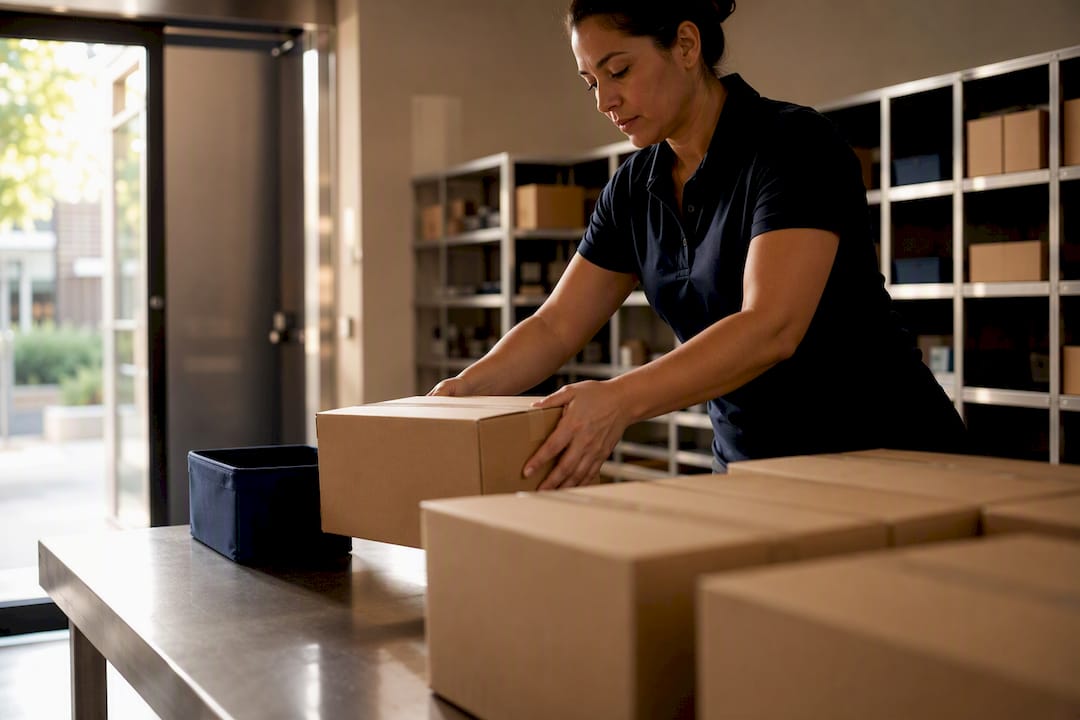
The package receiving process that works is a staffed, access-controlled package room, or a contracted on-site Package Manager, running a simple intake log, resident text and email alerts, and clear rules for overflow. Lockers or a smart room suit high-volume or low-staff sites. Under 100 units a day, a logged, staffed room usually beats hardware alone.
TL;DR:
- A staff-led, access-controlled package room or contracted on-site manager is essential for properties handling more than 100 packages daily or with high-volume peaks.
- Implementing a standardized SOP with verification, photo records, logging, and resident notification reduces disputes, theft, and staff churn while increasing satisfaction.
- Storage should be divided into zones for standard, oversized, refrigerated, and returning items, each with strict access rules to prevent mix-ups and theft.
- Lockers are suitable for medium volume but can overflow during holidays, and software-only solutions are inadequate for high-volume, after-hours, or refrigerated deliveries.
- Contracting a dedicated package manager significantly improves process ownership, efficiency, and turns package handling into a revenue-generating amenity.
Table of Contents
- What Does a Solid Package Receiving Process Actually Include?
- How Do You Set Up a Package Intake and Pickup SOP?
- Package Room, Smart Room, Lockers, or Notification Software: Which Fits Your Property?
- Who Should Run Your Package Room: In-House Staff, a Hybrid Model, or a Contracted Manager?
- How Do You Size Your Package Room and Plan for Peak Periods?
- Postal Solutions’ Field Perspective on Package Receiving
- Get Your Package Room Off Your Leasing Team’s Plate
- Sources
- FAQ
What Does a Solid Package Receiving Process Actually Include?
A working package receiving process covers six moving parts: intake, logging, secure storage, resident notification, pickup verification, and a defined path for returns or misdeliveries. Skip any one of them and the gaps show up fast, usually as a resident standing at your leasing desk asking where their package went.
Industry guidance from the National Apartment Association recommends logging every received and delivered parcel, notifying residents promptly, and building carrier-facing procedures that account for how USPS and other carriers actually operate on-site. That’s not bureaucracy for its own sake. It’s the difference between a property that can answer “where’s my package” in ten seconds and one that spends twenty minutes digging through unsorted boxes.
Here’s what a compliant process gets you, and what a weak one costs you:
- Recovered staff time — leasing agents stop functioning as unpaid package clerks
- Fewer disputes — a timestamped log ends most “I never got it” conversations
- Higher resident satisfaction — package handling ranks among the most visible daily touchpoints residents have with management
- A sellable amenity — a clean, organized package room is something leasing tours can point to
- Lower theft exposure — access control and a paper trail deter both porch theft and internal loss
- Reduced staff churn — nobody signed a lease to sort strangers’ Amazon orders for two hours a day
Properties running an informal, unlogged process tend to see the opposite of every item above: disputes escalate, reviews mention “lost packages,” and turnover among leasing staff creeps up because the job quietly became something else.
How Do You Set Up a Package Intake and Pickup SOP?
A repeatable standard operating procedure turns package handling from a daily scramble into a five-minute routine. Here’s the sequence that holds up under real delivery volume:
- Verify the delivery against the carrier manifest or the label on the box, catching mislabeled units before they get shelved wrong.
- Photograph or scan the package and label together, creating a visual record that ends most “damaged on arrival” disputes before they start.
- Log the record: carrier name, delivery timestamp, staff member on duty, resident name, unit number, and tracking number.
- Sort into the correct storage zone based on size, temperature needs, or return status.
- Trigger the resident notification immediately, not at end of day.
- Verify identity at pickup using a name match, unit confirmation, or a QR code scan tied to the original log entry.
- Log the pickup with a timestamp and the staff member who released it, closing the chain-of-custody loop.
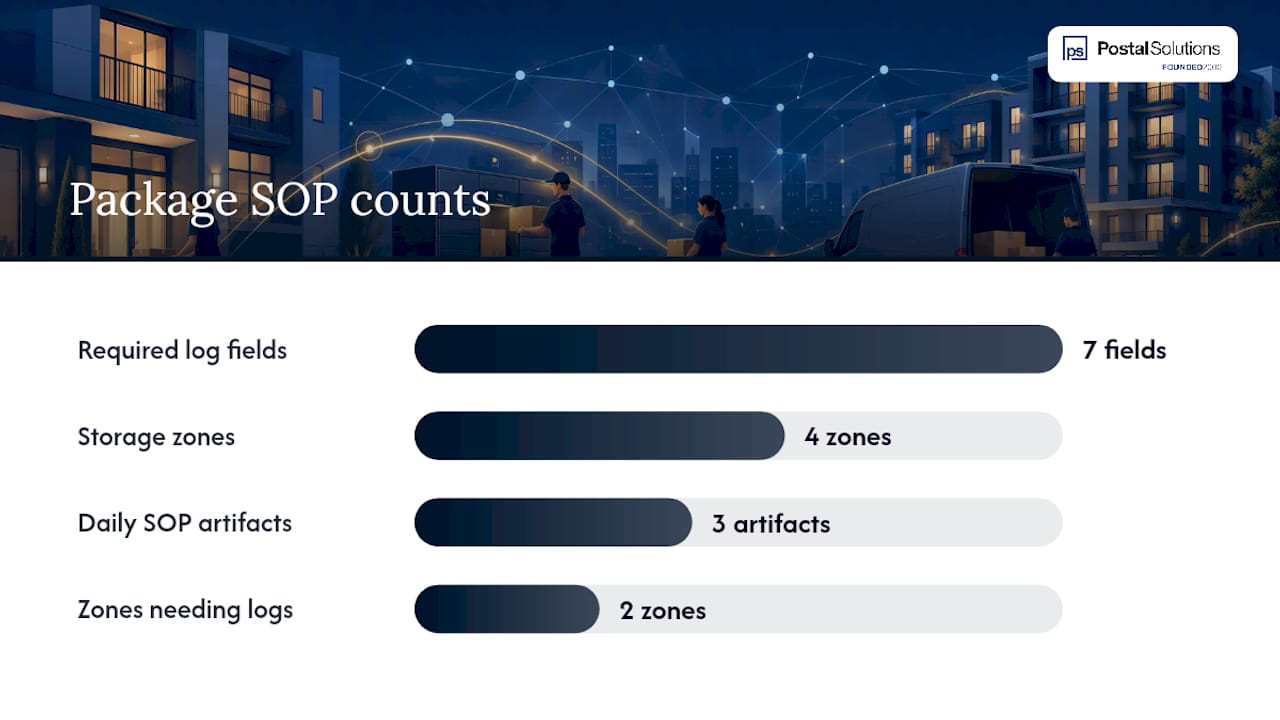
Your package log needs, at minimum, seven fields: date received, carrier, tracking number, resident name and unit, staff initials, storage location, and pickup timestamp. That’s the backbone of chain-of-custody. Without it, you can’t prove a package arrived, and you can’t prove it left.
Storage should split into four zones: standard shelving, an oversized bay for furniture and appliance boxes, a refrigerated unit for meal kits and perishables, and a separate return-staging area so outbound items never get confused with new arrivals. Each zone needs its own access rule. Standard and oversized can be open to any on-duty staffer; refrigerated and return staging should require a log entry every time someone touches them.
Three artifacts make this SOP actually usable day to day: a one-page pictorial guide posted at the delivery entrance for drivers, a printed or digital package-log template, and a standard resident pickup text (“Your package from carrier] arrived at [time]. Bring photo ID to the package room, open until [time].”). Carrier training materials paired with a simple pictorial SOP for drivers [measurably reduce non-compliance during peak periods, which matters most exactly when you can least afford a bottleneck.
Pro Tip: Post the pictorial SOP where drivers can see it before they walk in, not after. A sign at the front door prevents wrong-zone drop-offs; the same sign taped to the inside wall gets ignored.
Property teams building out lease language around accepted deliveries and liability waivers should also look at how leasing documentation can formally define what the property is and isn’t responsible for once a package is logged.
Package Room, Smart Room, Lockers, or Notification Software: Which Fits Your Property?
Four formats dominate the multifamily package space, and none of them is universally right. The mistake most owners make is buying capacity they don’t need, or worse, buying software when they actually need labor.
- Staffed package room: flexible on size and shape, handles oversized and refrigerated items easily, but needs a person on-site during operating hours.
- Smart package room (open shelving plus computer vision): holds two to three times more parcels per linear foot than lockers and can cut resident pickup time to seconds, making it a strong fit for dense, high-volume urban properties.
- Locker banks: work well for medium package volume, but fixed compartment counts mean lockers overflow fast during holidays or move-in week, when demand can double or triple overnight.
- Notification-only software: organizes a manual process and cuts resident tickets, but doesn’t replace the labor a busy property needs for after-hours or high-volume intake.
Who Should Run Your Package Room: In-House Staff, a Hybrid Model, or a Contracted Manager?
Three staffing models cover almost every property: fully in-house, a hybrid where leasing staff cover intake between other duties, and a contracted on-site Package Manager dedicated to the room.
- In-house, dedicated role: works at larger properties with enough volume to justify a full-time or near-full-time hire.
- Hybrid: common at smaller properties, but it’s the model most likely to fail during peak weeks, since leasing duties and package duties compete for the same hours.
- Contracted on-site Package Manager: a dedicated person works your community for scheduled hours, separate from leasing staff, handling intake, sorting, logging, and resident-facing pickup.
At properties without any dedicated solution, staff can lose several hours a day to package handling alone. Automating or contracting that intake process cuts touchpoints and hands those hours back to leasing and renewals. The contracted model also opens a revenue angle: many communities structure the package room as a paid resident amenity, retaining the margin over the cost of the service instead of treating it as a pure budget line.
How Do You Size Your Package Room and Plan for Peak Periods?
Track five numbers weekly: daily package count, average dwell time before pickup, average pickup transaction time, share of oversized packages, and staff touches per package. These tell you whether your current setup is holding or cracking.
Sizing rules of thumb:
- Under roughly 100 packages a day, a staffed room with a solid log usually beats hardware spend.
- Rising oversized-package share (furniture, appliances, bulk orders) points toward needing a dedicated oversized bay regardless of unit count.
- Dense, high-volume urban properties, some report hundreds of packages daily, justify a smart room or expanded lockers.
- Frequent locker overflow during any given week signals it’s time to add staffed overflow space, not more lockers.
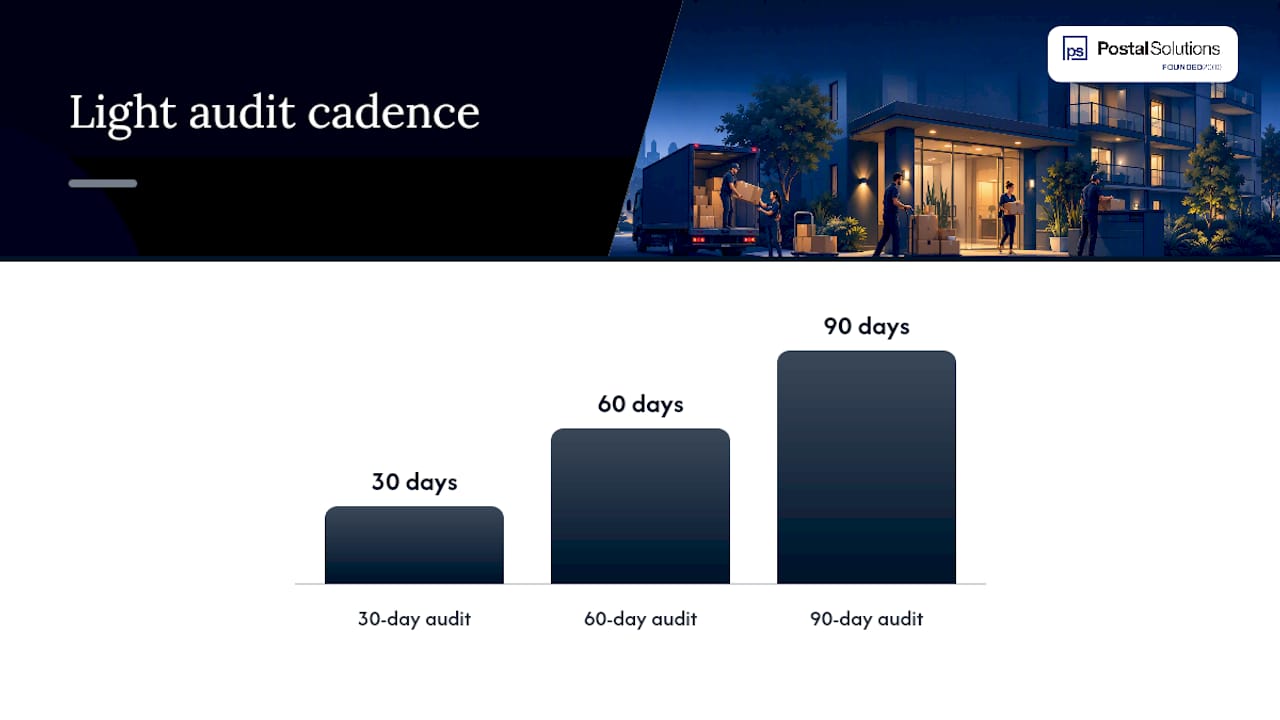
Build a surge checklist before November, not during it: designate overflow shelving in advance, line up temporary staff coverage for move-in and holiday weeks, push a resident communication about pickup windows, and confirm carrier drop-off instructions are current. Run a light audit every 30, 60, and 90 days checking log accuracy, dwell times, and unclaimed package counts.
Pro Tip: Track dwell time separately from pickup transaction time. A package sitting three days before pickup isn’t a staffing problem, it’s a notification problem, and the fix is different.
Postal Solutions’ Field Perspective on Package Receiving
After more than 25 years running on-site package operations, the pattern is consistent: properties don’t fail because they lack technology, they fail because nobody owns the process. A dedicated Package Manager model fixes that by design, not by accident.
The fastest wins we see: stand up an intake log and resident text alerts inside one week, post a pictorial SOP at the delivery entrance, and carve out a dedicated overflow zone before peak season, not during it. None of these require new hardware. They require someone whose actual job is the package room, not someone squeezing it between lease renewals.
— Postal Solutions
Get Your Package Room Off Your Leasing Team’s Plate
Postal Solutions is the option for owners who’ve read the SOP above and would rather have someone else run it. A dedicated on-site Package Manager works your community up to six days a week, handling daily acceptance, sorting, resident notifications, weekly audits, and overflow for oversized or refrigerated deliveries, using the locker or room system you already have.
Contracting the work does two things at once: it hands leasing staff back the hours they were losing to box sorting, and it turns the package room into a visible amenity your team can point to on tours. Because residents already expect secure on-site package handling, many communities structure it as a paid amenity through a Resident subscription priced between $5 and $15 per month, keeping the margin over the cost of the service. Postal Solutions works with existing hardware, including setups covered in our guide to apartment package lockers and room integrations, and even properties with no locker system at all.
If you’re ready to see where your current process is losing time, request a property assessment or download the free package room management guide for the templates and checklists to start with this week.
Sources
For deeper detail, see the NAA’s package management guidance, Postal Solutions’ manager’s guide to package room operations, and our package security guide.
- Package management: logistics & technology prevents apts getting boxed — NAAHQ
- Streamline package delivery in residential buildings — Smart Package Room blog
- Multifamily package management solutions impact resident retention — TechScribe
FAQ
What Is the First Step in Setting Up a Package Receiving Process?
Start with an intake log and resident notification system before spending on hardware. That single change reduces resident service tickets almost immediately, even at properties still sorting packages manually.
How Many Packages a Day Justify a Smart Room Over Lockers?
There’s no single trigger number, but properties in dense urban buildings reporting hundreds of packages a day tend to outgrow lockers fast. Smart rooms hold two to three times more parcels per linear foot and handle that volume without overflow.
How Much Does Postal Solutions’ Package Room Service Cost?
Pricing for Postal Solutions’ core services, including Daily On-site Package Management and Weekly Package Room Audits, isn’t published and depends on property size and volume. Current details are available directly on the Postal Solutions site.
What Records Should Every Package Log Include?
At minimum: date and time received, carrier, tracking number, resident name and unit, staff initials, storage zone, and pickup timestamp with the staff member who released it. This is the chain-of-custody trail that ends most delivery disputes.
Can Software Alone Replace Staff for Package Handling?
No. Notification and concierge software organizes the process and cuts tickets, but it doesn’t replace the labor needed for intake, sorting, and after-hours retrieval at busy properties.
Recommended
Ready when you are
Fix your package room — start with a free proposal
Daily on-site Package Manager, resident text & email pings*, and a tour-ready amenity. Tell us your unit count and we'll send a right-sized proposal — usually within one business day.
- ✓ 16–30 hours back every week
- ✓ Works with any locker system
- ✓ Faster, friction-free resident pickup
- ✓ An easy ancillary income addition