
August 12, 2026
How to Run a Package Room Audit That Actually Works
Transform your package management with a successful audit—boost efficiency, track metrics, and improve delivery operations today!

A package room audit is a focused operational review that measures every stage of your delivery cycle — intake, scanning, notification, pickup, overflow, returns, and security — and converts those findings into a prioritized action plan. Start today with three steps: count your current backlog and note how long the oldest packages have been sitting, confirm your notification system sent alerts for the last 10 deliveries, and post a one-line intake SOP at the delivery entrance. The rest of this article gives you a repeatable checklist, the metrics that matter, and a one-page report template you can hand to an asset manager by Friday.
Key Takeaways
A consistent package room audit cadence — daily light checks, weekly formal reviews, and a monthly one-page report — is the most direct path from package chaos to a measurable, defensible operation.
| Point | Details |
|---|---|
| Run weekly formal audits | A 20–30-minute weekly check catches notification failures, dwell-time issues, and mis-scans before they generate complaints. |
| Target dwell time under 48 hours | During peak season, packages sitting longer than 48 hours are the leading driver of resident complaints and theft risk. |
| Post SOPs in three locations | Place a pictorial SOP at the delivery entrance, front desk, and inside the package area to align carriers, staff, and residents. |
| Track five core metrics | Daily parcel count, average dwell time, pickup rate within 48 hours, complaints per 100 packages, and notification success rate cover the full operation. |
| Run a capacity audit every September | Auditing before holiday volume arrives gives you time to add overflow space and surge staffing before the crunch. |
| Postal Solutions manages it for you | On-site Package Managers run daily operations, weekly audits, and monthly reporting so your leasing team stays focused on leasing. |
Table of Contents
- What does a package room audit actually cover?
- Why regular package room audits matter for multifamily properties
- Step-by-step package room audit checklist
- What metrics should you track and what are the targets?
- What problems do audits typically uncover — and how do you fix them?
- Smart lockers, access-controlled rooms, or a hybrid — which fits your property?
- What SOPs, signage, and staffing does a well-run package room need?
- How to turn audit findings into a report your asset manager will actually read
- How Postal Solutions runs package room audits on-site
- The audit is the competitive edge most operators overlook
- Postal Solutions handles the audit work for you
- Sources
- FAQ
What does a package room audit actually cover?
A package room audit is not a vague walkthrough. It has a defined scope, and everyone involved should agree on that scope before the first step is taken.
Audit scope — the seven zones every review should touch:
- Intake: How carriers enter, where they drop packages, and whether a staff member or automated system receives them
- Scanning and logging: Whether every package gets scanned into a chain-of-custody system at the moment of receipt, with no gaps
- Notification: Whether residents receive an accurate, timely alert — text, email, or app push — and whether the system logs delivery confirmation
- Storage and placement: Whether packages are organized by size, zone, or resident unit in a way that makes retrieval fast
- Pickup: Whether residents are retrieving packages within an acceptable window and whether the handoff is documented
- Overflow and returns: How unclaimed, oversized, or undeliverable packages are staged, tracked, and eventually returned or disposed of
- Security: Access control (who can enter and when), camera coverage, and the package audit trail that proves chain of custody
Who belongs in the room (or on the report):
- On-site staff who handle daily intake and sorting
- Leasing team members who field resident complaints
- Property operations or facilities leads
- Carriers (UPS, FedEx, USPS, Amazon) for driver SOP alignment
- Residents, when pickup behavior data is being reviewed
- Portfolio or asset managers who need the one-page summary
One thing a standard operational audit does not cover: vendor contract negotiations, hardware procurement decisions, or carrier rate structures. Those belong in a separate procurement review. Keep the audit focused on operational performance so findings stay actionable.
Why regular package room audits matter for multifamily properties
Leasing staff at many multifamily properties spend a meaningful portion of their day managing packages — sorting, fielding “Where’s my package?” calls, and chasing down mis-scanned items. That time has a real cost. Standardized package management and tracked KPIs can reduce those leasing-desk hours and shift staff attention back to renewals and tours.
The business case for regular package room audits comes down to five outcomes:
- Hours returned to leasing: Every hour a leasing agent spends sorting boxes is an hour not spent showing a unit or closing a renewal
- Better tour optics: A clean, organized, professionally run package room is a visible amenity — prospects notice it, and it signals that the property is well managed
- Fewer resident complaints: Notification gaps and lost packages generate tickets; audits catch both before they become patterns
- Lower theft and loss: A documented chain-of-custody process and camera coverage reduce incidents and give you evidence when disputes arise
- Peak-season readiness: Holiday volume can roughly increase to about twice typical daily counts. Auditing before peak season — September is the recommended window, according to mailroom management best practices — lets you fix bottlenecks before they become crises
Recommended audit cadence:
- Daily light check (5 minutes): Confirm no packages are sitting in the lobby or hallway, verify the notification queue has no failures, and do a quick count of unclaimed items older than 48 hours
- Weekly formal check (20–30 minutes): Full checklist run — intake observation, scan verification, utilization count, notification test, exception review
- Monthly deep audit (45–60 minutes): Full checklist plus metric trend review, SOP compliance check, and a one-page report for the asset or regional manager
- Holiday peak cadence: Add a second weekly formal check from mid-November through the first week of January, and run a capacity audit in September before volume climbs
Step-by-step package room audit checklist
A repeatable locker and package room audit reviews utilization, delivery flow, notification accuracy, pickup behavior, and operational bottlenecks. Here is the sequence to follow on-site, from arrival to final count. Budget 20 minutes for a small building (under 100 units) and up to 60 minutes for a large community.
- Arrival and access check: Confirm the delivery entrance is unlocked or accessible per carrier hours. Check that the QR/PIN code for driver access is current and has not been shared beyond active carriers.
- Intake observation: Watch or reconstruct the last intake session. Were packages placed in the designated intake zone? Did a staff member or system scan each item immediately on receipt?
- Scan and log verification: Pull the last 24 hours of scan logs. Cross-reference physical packages against the log. Flag any package present but not logged, or any log entry with no corresponding physical item.
- Locker and room utilization review: Count occupied versus available slots by size category (small, medium, large, oversized). Note any size category above 80% capacity.
- Notification test: Select five recent deliveries and confirm each triggered a resident alert. Check the notification log for failures or delays over two hours.
- Pickup observation: Identify packages with a dwell time over 48 hours. Note the count and the oldest item. Flag any perishable items regardless of dwell time.
- Exception review: Review the exception log for the audit period — mis-scans, refused deliveries, oversized items staged outside the main room, and unclaimed packages past the property’s stale-package policy.
- Security inspection: Confirm cameras are operational and cover the intake zone and storage area. Verify access logs show no unauthorized entries.
- Final counts and notes: Record total packages on hand, broken down by size. Note the top three issues observed and any immediate corrective actions taken during the audit.
Sample audit form fields
| Field | What to record |
|---|---|
| Date and auditor name | Date of audit, name of person conducting it |
| Zone or building | Specific package room, locker bank, or wing |
| Total packages on hand | Count by size: small / medium / large / oversized |
| Average dwell time (hours) | Mean hours packages have been waiting for pickup |
| Packages over 48-hour threshold | Count of items exceeding the dwell-time target |
| Notification failures | Number of alerts that did not send or were delayed |
| Top exceptions | Up to three issues: mis-scans, overflow, perishables |
| Immediate actions taken | What was corrected during the audit itself |
| Owner-requested actions | Items requiring management approval or resources |
| Next review date | Scheduled date of the next formal audit |
Pro Tip: When time is short, prioritize steps 3 (scan verification), 5 (notification test), and 6 (pickup dwell time). Those three steps catch the issues that generate the most resident complaints.
What metrics should you track and what are the targets?
Core package management KPIs give you a data-backed view of operational performance and show exactly where staff time is being lost or where resident satisfaction is at risk. Keep the dashboard tight: daily parcel count, dwell time, and complaints per 100 packages are more actionable than a sprawling set of 20 indicators.
Data sources to pull from:
- Package management software logs (scan timestamps, notification records)
- Daily manual counts when software coverage is incomplete
- Resident complaint tickets from your property management system
- Staff time logs or shift reports
Automation and data dashboards are increasingly central to scalable package operations in modern multifamily buildings, with tech trends in 2026 pointing toward integrated platforms that surface these metrics automatically. If your current system does not export dwell time or notification success rate, that gap itself is an audit finding worth flagging.
What problems do audits typically uncover — and how do you fix them?
Most package room failures cluster around a handful of recurring patterns. Here is what audits surface most often, and what to do about it:
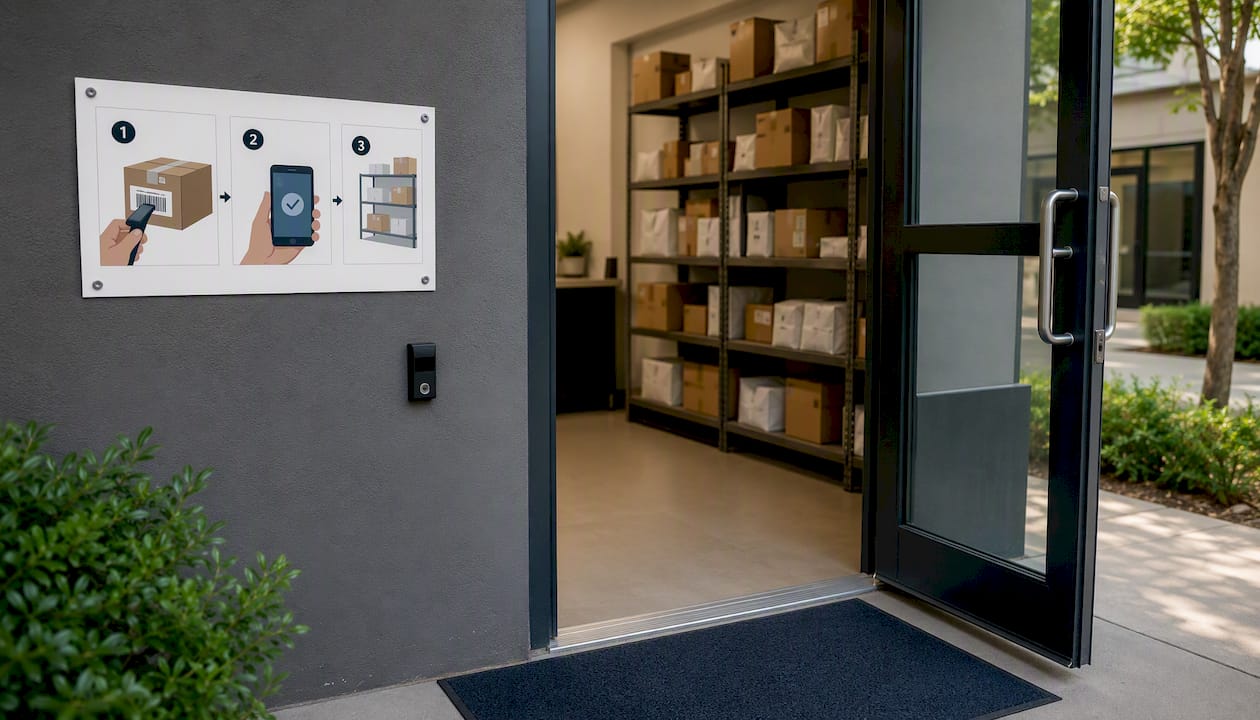
Carrier mis-scans and handoff inconsistency Packages arrive but never get logged, or get logged to the wrong unit. Fix: post a pictorial SOP at the delivery entrance with the scanning steps in three images or fewer, and issue carrier-specific QR/PIN codes so you can trace which driver made the error.
Overflow into lobbies and hallways When the package room hits capacity, boxes migrate to common areas — a liability and a leasing optic problem.
Long dwell times and unclaimed packages Residents forget, ignore, or never receive their notification. Fix: add a second reminder at 48 hours and a final notice at 72 hours with a pickup deadline. Some properties offer a small incentive (priority locker access, a move-in credit) for residents who maintain a clean pickup record.
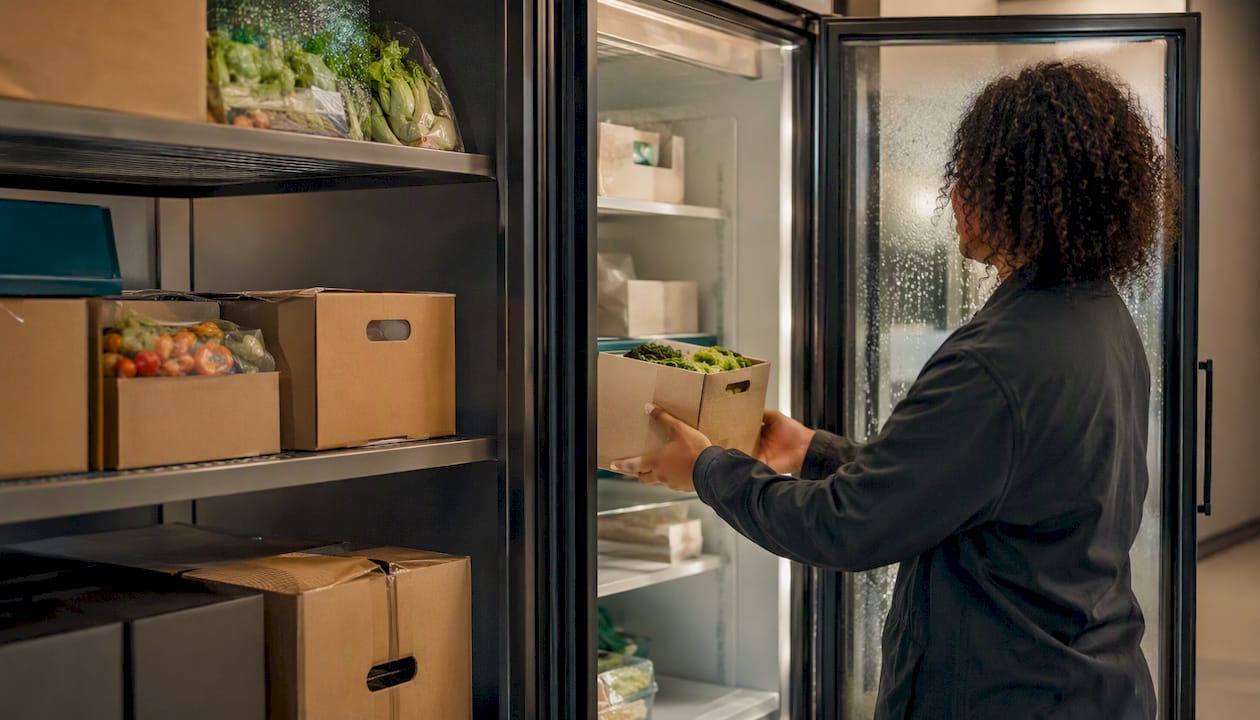
Perishables and temperature-sensitive deliveries A grocery delivery sitting in a 75°F package room for six hours is a health and liability issue. Fix: establish a written perishables policy — refrigerated staging for items marked perishable, a two-hour resident notification window, and a documented disposal process if unclaimed.
Oversized items blocking access Large items staged in the main room reduce usable space and create trip hazards. Fix: designate a separate oversized staging zone and include it in every audit count.
Quick wins vs. longer-term fixes:
- Quick wins (same week): post SOP signage, update carrier PIN codes, add a 48-hour reminder to your notification cadence
- Medium effort (2–4 weeks): retrain staff on scanning protocol, reconfigure shelving by size category, add a utilization alert to your software dashboard
- Long-term (1–3 months): evaluate hardware upgrades, add refrigerated storage, or move to a hybrid locker-plus-room model
Pro Tip: Run a capacity audit every September — before holiday volume arrives. That gives you eight weeks to add temporary overflow space or adjust your carrier intake schedule before the crunch hits.
Smart lockers, access-controlled rooms, or a hybrid — which fits your property?
The right configuration depends on your building’s unit count, package volume mix, and staffing model. Open shelving in an access-controlled package room can store 2–3x more packages per square foot than a locker bank of the same footprint, and rooms handle oversized and perishable items far more readily. Lockers, on the other hand, give residents 24/7 self-serve access without any staff involvement at pickup.
| Attribute | Smart lockers | Access-controlled room | Hybrid model |
|---|---|---|---|
| Packages per sq ft | Lower (fixed cell sizes) | Higher (flexible shelving) | Moderate (lockers + overflow room) |
| 24/7 resident access | Yes, fully automated | Depends on staffing hours | Yes (lockers) + staffed hours (room) |
| Oversized items | Limited by cell dimensions | Flexible | Room handles oversized |
| Perishables | Requires refrigerated cells | Easier to add refrigeration | Room handles perishables |
| Audit trail | Automated per cell | Requires staff scanning | Combined logs |
| Capital cost | Higher upfront | Lower if room already exists | Moderate |
| Staffing impact | Minimal at pickup | Higher — staff must retrieve | Balanced |
When each model fits:
- Smart lockers alone: Works well for smaller urban properties (under 100 units) with high package velocity and minimal oversized volume, where 24/7 self-serve is a leasing differentiator
- Access-controlled room: Better for larger communities with high oversized volume, perishable deliveries, or a staffing model that already includes a dedicated package handler
- Hybrid: The most common high-performing configuration — lockers handle high-volume small parcels while a monitored package room manages oversized and perishable deliveries. It also gives you redundancy when one system is at capacity
For properties already running a room-plus-locker setup, the audit should evaluate both systems separately and then assess how well they hand off to each other.
What SOPs, signage, and staffing does a well-run package room need?
A package room without documented procedures is an audit waiting to fail. The SOP does not need to be a 20-page manual. It needs to be short enough that a carrier reads it in 30 seconds and a new hire follows it on day one.
SOP elements to document:
- Driver intake steps: where to enter, where to place packages, how to scan or hand off to staff
- Scanning rules: every package scanned at receipt, no exceptions, with unit number confirmed before shelving
- Overflow and oversized rules: where to stage, how to log, who to notify
- Perishables handling: refrigerated staging location, two-hour notification window, disposal policy
- Resident ID verification: what counts as valid ID at pickup, and how to log the handoff
- Stale and unclaimed packages: timeline for reminders, escalation steps, and final disposition
Signage placement: Post a simple pictorial SOP in three locations — at the delivery entrance (for carriers), at the front desk (for staff reference), and inside the package area (for residents picking up). Each version should be one page, use images where possible, and include a contact number for exceptions.
Staffing cadence:
- Daily: a 5-minute check at the start and end of each shift — confirm no packages in common areas, verify notification queue
- Scheduled sorting windows: set fixed intake hours when possible so carriers know when staff are present
- Holiday surge: add a second daily sort during peak season and cross-train at least one additional staff member on intake procedures
- New hire training: walk every new hire through the full SOP on day one, have them observe one complete intake session, and confirm they can run the notification system independently
Pro Tip: Issue carrier-specific QR or PIN codes rather than a single shared code for the delivery entrance. When a mis-scan or unauthorized entry occurs, you can trace it to a specific carrier and address it directly — rather than resetting everyone’s access and starting over.
How to turn audit findings into a report your asset manager will actually read
The goal of every package room audit is a one-page summary that a regional or asset manager can review in three minutes and approve actions from. More than one page, and it gets filed. Less than the key metrics, and it cannot drive decisions.
One-page report fields:
- Property name, audit date, auditor name
- Summary metrics: total packages on hand, average dwell time, pickup rate within 48 hours, complaints per 100 packages, notification success rate
- Top three issues identified during the audit
- Immediate actions taken (corrected during the audit itself)
- Owner-requested actions with a recommended owner and deadline for each
- Next scheduled review date
Appendix (attach when relevant):
- Raw audit log from the sample form
- Photo evidence of exceptions (overflow, signage gaps, camera blind spots)
- Carrier deviation notes (mis-scans, unauthorized entries)
- KPI trend charts showing the last three to six months of data
Prioritizing actions: Use a simple impact-versus-effort framework. Place each finding in one of four buckets: high impact / low effort (fix immediately), high impact / high effort (schedule and resource), low impact / low effort (batch with other quick wins), low impact / high effort (defer or drop). Most audits surface two or three high-impact / low-effort items — those go on the action plan first.
Who gets the report:
- On-site manager: full report plus action items
- Regional or asset manager: one-page summary only
- Leasing team: notification accuracy and complaint metrics only (they do not need the full operational detail)
Numbered action items with a named owner and a deadline convert faster than a bulleted list of observations. Write each action as: “Action → Owner → Deadline.”
How Postal Solutions runs package room audits on-site
Postal Solutions operates on-site package room management for apartment and student housing communities, with a dedicated Package Manager working on-site up to six days a week. The audit cadence built into that model runs at three levels: a daily light check, a weekly formal audit, and a monthly deep review with a one-page report delivered to the property manager and, when requested, the asset or regional manager.
What the on-site Package Manager tracks and reports:
- Daily parcel count and size breakdown
- Average dwell time and pickup rate within 48 hours
- Notification success rate (alerts sent versus deliveries received)
- Staff hours saved per week compared to the pre-service baseline
- Theft and loss incidents per period
- Complaints per 100 packages, trended month over month
- Overflow events and how they were resolved
During peak season, the cadence shifts: a second weekly formal audit runs from mid-November through early January, and a capacity audit is completed in September to identify which size categories will hit capacity first.
Postal Solutions has managed on-site package operations for multifamily communities for 25 years. The weekly audit and chain-of-custody logging built into every engagement mean property managers receive a consistent, documented record of operational performance — not just a count of boxes received, but a traceable record of every package from intake to pickup, with exceptions flagged and resolved before they reach the leasing desk.
The service integrates with existing package room hardware and locker systems, so the audit process works whether the property runs smart lockers, an access-controlled room, or a hybrid setup. For properties that want to see what a package room review looks like before committing to a full management contract, the free guide at fixmypackages.com walks through the same checklist framework used on-site.
The audit is the competitive edge most operators overlook
Most multifamily operators think about package management as a logistics problem. Get the boxes in, get them out, keep residents from complaining. That framing misses the bigger opportunity.
A property that runs consistent, documented package room audits is doing something most of its competitors are not: measuring operational performance with the same rigor applied to occupancy or NOI. That discipline shows up in leasing conversations, in renewal rates, and in the confidence a regional manager has when a resident escalates a complaint — because the audit trail answers the question before it becomes a dispute.
The operators who treat the weekly package audit as a five-minute chore and the monthly formal audit as a portfolio-ready deliverable are the ones who turn a package room from a cost center into a leasing amenity. The 20-minute weekly check is not overhead. It is the data that makes every other operational decision easier to defend.
Start with the weekly check. Schedule the monthly audit. Share the one-page report. The properties that do this consistently are the ones that stop losing leasing hours to package chaos — and start using the package room as proof that life here is better managed.
Postal Solutions handles the audit work for you
Running a tight package room operation takes consistent daily attention — the kind that is hard to sustain when your leasing team is already stretched. Postal Solutions’ On-Site Package Room Management puts a dedicated Package Manager at your property up to six days a week: receiving, sorting, securing, logging chain of custody, sending resident notifications, and running weekly audits so you always have a current picture of operational performance.
The service works with the package room or locker hardware you already have, handles overflow and oversized deliveries, and delivers a monthly one-page report your asset manager can act on. Many communities structure it as a paid resident amenity, turning a budget line item into a source of ancillary income. Download the free package room management guide to get the full audit checklist and report template, or request an on-site assessment to see what a professionally managed package operation looks like at your property.
Sources
- Package Management KPIs for Multifamily Teams | Parcel Pending
- How to Audit Package Lockers for More Efficient Deliveries
- Mailroom Management Best Practices | Smart Package Room
- Apartment Package Room Solutions | Smart Package Room
- Multifamily package management best practices (ApartmentList)
FAQ
What is a package room audit?
A package room audit is a structured operational review that checks every stage of a property’s delivery cycle — intake, scanning, notification, pickup, overflow, and security — and produces a prioritized action plan. It typically runs in 20–60 minutes depending on building size.
How often should a multifamily property run package room audits?
Most properties benefit from a daily 5-minute light check, a weekly 20–30-minute formal audit, and a monthly deep review with a written report. Add a second weekly audit during the holiday peak season from mid-November through early January.
What is a package audit trail?
A package audit trail is the documented record of every package from intake to pickup — including who received it, when it was scanned, what notification was sent, and who signed for it at pickup. It is the primary evidence used to resolve theft claims and carrier disputes.
What should you not do during a package room audit?
Avoid correcting every issue on the spot without documenting it first — undocumented fixes leave no record for trend analysis or reporting. Also avoid auditing only the areas that look clean; the most useful findings come from the zones that staff tend to skip.
How does a package room audit differ from a locker audit?
The scope is the same — utilization, notification accuracy, dwell time, exceptions, and security — but a locker audit focuses on cell-level data (which sizes are full, which notifications failed per cell), while a package room audit also covers shelving layout, staff scanning compliance, and physical access control for the room itself.
Recommended
- Package Room Reviews: What Property Managers Should Check — Postal Solutions Blog
- Package Room Management for Apartments: A Manager’s Guide — Postal Solutions Blog
- Give Your Leasing Team Hours Back | Postal Solutions
- Package Notification System for Apartments: A Manager’s Guide — Postal Solutions Blog
Ready when you are
Fix your package room — start with a free proposal
Daily on-site Package Manager, resident text & email pings*, and a tour-ready amenity. Tell us your unit count and we'll send a right-sized proposal — usually within one business day.
- ✓ 10–20+ hours back every week
- ✓ Works with any locker system
- ✓ Faster, friction-free resident pickup
- ✓ An easy ancillary income addition