
September 4, 2026
5 Steps to Fix Carrier Check In With Proven SOPs for Leasing Teams
A five step carrier check in process and ready to use SOPs for leasing teams. Cut lost package claims and reduce staff interruptions.
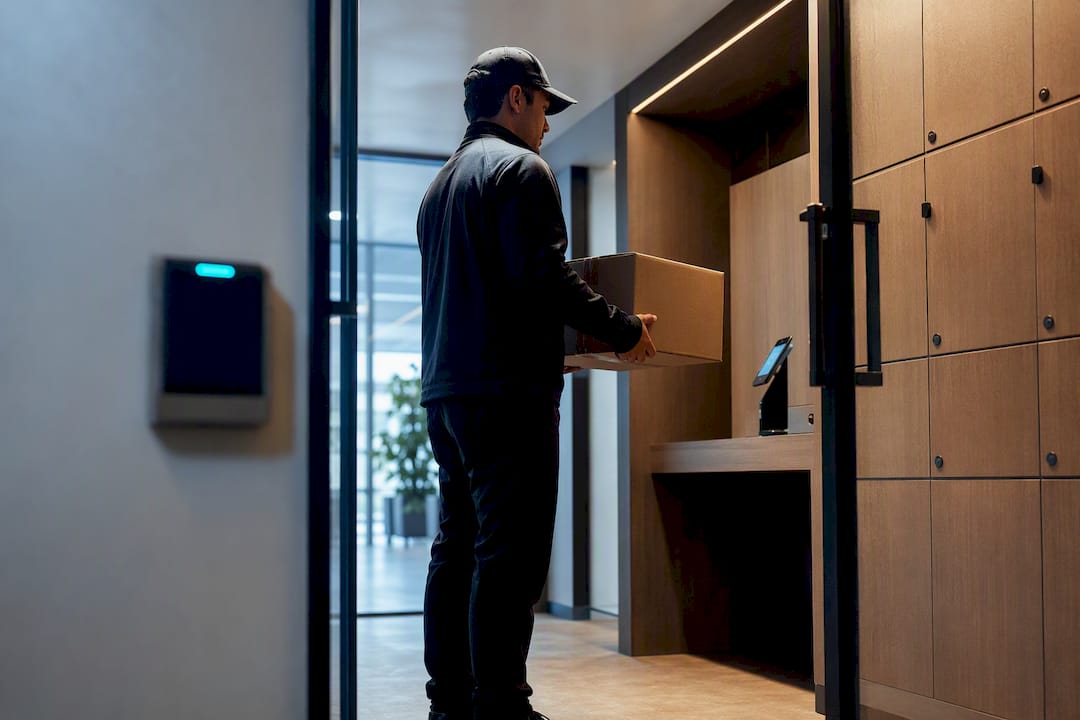
A carrier check-in process has to accomplish one thing above all else: create a time-stamped, auditable record of every delivery, the moment it enters the building, so the parcel is secured and the resident is notified fast. The workflow runs arrival, authentication or scan, logging, storage, and notification, in that order. Get those five steps right and you cut lost-package claims, stop drivers from interrupting the leasing desk, and give residents a pickup they can count on.
TL;DR:
- Automated logging combined with camera corroboration is essential for resolving resident disputes quickly and maintaining a reliable record of package deliveries.
- Using carrier-specific access methods like PIN or QR codes for regular drivers enhances auditability and allows instant revocation, while video verification suits ad hoc carriers.
- Managing oversized, perishable, and same-day deliveries requires dedicated overflow zones, clear labeling, and strict procedures, with hybrid intake systems offering better resilience.
- Consistent adherence to SOPs, proper staff training, and regular audits of delivery and scan volume help prevent noncompliance and operational breakdowns.
- Outsourcing package management to a dedicated on-site service can streamline check-in, reduce staff workload, and ensure reliability during peak times without relying solely on leasing staff.
Table of Contents
- The Standard Carrier Check-In Process, Step by Step
- Which Carrier Access Method Fits Your Property?
- What to Log for a Defensible Chain of Custody
- Handling Oversized, Perishable, and Same-Day Deliveries
- Building Carrier SOPs That Actually Get Followed
- Staffing the Package Room Without Burning Out Your Team
- Fast Fixes for the Most Common Carrier Problems
- Security Protocols to Prevent Unauthorized Access
- Handling Exceptions and Emergencies During Check-In
- Connecting Carrier Check-In to Your Property Software
- Data Privacy and Compliance for Carrier Information
- Best Practices for Verifying Carrier Identity
- Metrics That Actually Tell You the Process Is Working
- How On-Site Package Management Fits the Bigger Leasing Picture
- Get Daily Carrier Check-In Handled Without Adding to Your Leasing Team’s Plate
- Sources
- FAQ
The Standard Carrier Check-In Process, Step by Step
Most package disputes trace back to a skipped step, not a broken system. A repeatable workflow closes that gap.
- Arrival and staging. Drivers pull up to a marked drop point, ideally near the package room entrance, with signage showing exactly where to stop and what to do next.
- Authentication. The carrier scans a QR code, enters a PIN, or checks in through an intercom, depending on whether they’re a regular route driver or a one-off delivery.
- Scanning and logging. The system (or staff member) captures tracking number, carrier name, timestamp, and handler in one pass. Keep the required fields to four or five. More than that, and drivers start skipping steps to save time.
- Storage and placement. Standard parcels go into a locker or assigned shelf slot immediately. Oversized or perishable items follow a separate route (covered below).
- Resident notification. An automated text or email fires the moment the item is logged, with a pickup window attached.
Communities that automate this last step see faster pickup and higher resident satisfaction than those relying on manual notice. A three to five day pickup window, paired with reminders at the 48 and 96 hour marks, keeps turnover steady without staff having to chase anyone down. If your property runs lockers, pairing that hardware with a managed intake process closes most of the gaps a locker alone leaves open, something worth reviewing in a broader look at locker versus package room tradeoffs.
Which Carrier Access Method Fits Your Property?
Not every carrier needs the same level of verification, and treating them all the same either slows down your regular drivers or leaves your access-control loose for strangers.
- PIN and QR codes work best for regular-route drivers from USPS, UPS, FedEx, and Amazon. Issue a unique code per carrier, and you get an automatic audit trail every time it’s used, plus the ability to revoke access instantly if a route changes hands.
- Automated scanning or OCR cuts manual entry almost entirely. The system reads the label, timestamps it, and files it, so the driver’s total time at the door drops to seconds.
- Video intercom with remote unlock covers ad hoc carriers, freight deliveries, or couriers who show up once and never again. Staff (or an off-site monitoring service) verify the person on camera before releasing the door. Video intercom systems give you that verification step without requiring someone stationed at the entrance all day.
- Staff-monitored intake still matters for high-value or irregular deliveries, even at properties running mostly automated systems.
Pro Tip: Reserve PIN and QR access for carriers with a documented delivery history at your property. Anyone new gets routed through intercom verification for the first few drops, then upgraded once the pattern is established.
What to Log for a Defensible Chain of Custody
A log is only as good as the dispute it can settle. When a resident claims a package never arrived, the property needs a record that holds up, not a shrug and a “we’ll check.”
The minimum fields worth capturing: timestamp, carrier name, tracking number, staff handler (or automated system ID), storage location, and a photo when the hardware supports it.
- Automated logs beat handwritten ones because they can’t be back-dated or misread, and they pair naturally with camera footage for corroboration.
- A photo taken at drop-off, timestamped and tied to the tracking number, resolves the majority of “it was never delivered” disputes in one message back to the resident.
- Retention policies matter too. Keep logs for at least 30 to 60 days past delivery so a late-filed claim doesn’t hit a dead end.
A time-stamped digital log with camera corroboration is the most reliable way to close out a missing-parcel dispute without weeks of back-and-forth, according to industry guidance on mailroom best practices. Run a quarterly audit comparing carrier scan counts against actual deliveries. It catches quiet drift, like a driver who started skipping the scanner three weeks ago, before it becomes a pattern. For properties layering cameras with locker or shelf storage, security-focused guidance for multifamily communities is worth reviewing alongside your log policy.
Handling Oversized, Perishable, and Same-Day Deliveries
Standard lockers were never built for a mattress topper or a grocery delivery. Exceptions need their own rules, written down, not improvised on the spot.
- Designate an overflow zone. Set aside shelf space specifically for oversized boxes, with a size cutoff (say, anything over 18 inches on a side) that routes straight there instead of jamming a locker.
- Label perishables clearly and store refrigerated items in a dedicated cold zone if your property has one; otherwise, notify the resident immediately and set a tight pickup deadline.
- Route signature-required deliveries to leasing staff rather than the package room, since these typically need identity verification the locker system can’t perform.
- Handle refused or misaddressed items with a clear return-to-sender procedure. Log the reason, notify the carrier, and set a pickup window for their retrieval.
Layering more than one intake method, lockers for standard parcels, shelving for overflow, staff handling for signature items, is more resilient than betting everything on one system. Communities using hybrid intake approaches handle carrier variability and package-size swings far better than single-method setups. For deeper detail on labeling and cold storage, see this guide to handling special deliveries.
Building Carrier SOPs That Actually Get Followed
Carrier noncompliance, drivers skipping the scanner or leaving packages outside the system entirely, is the most common operational failure in package management, and it usually comes down to friction, not malice. A driver on a tight route will take the fastest path every time, so your job is to make the compliant path the fastest one.
A pictorial SOP posted at the delivery entrance should show, at minimum: where to stage the vehicle, the scan or PIN steps in order, sizing rules for what goes where, and a phone number for questions. Skip the paragraphs. Drivers glance, they don’t read.
- Issue QR or PIN codes to regular drivers during onboarding, and follow up with a short outreach call or note introducing the process.
- Standardizing carrier communications this way improves compliance and speeds up deliveries compared to properties that leave the process undocumented.
- Run monthly spot audits comparing expected delivery volume against logged scans, and flag any carrier or route showing a gap.
- Signage, posted SOPs, and staff familiarity with regular drivers are consistently cited as the cheapest, most effective first fixes before anyone spends money on new hardware.
Pro Tip: Put a name and direct line on the SOP sign, not a generic office number. Drivers comply more consistently when they know a specific person will follow up.
Staffing the Package Room Without Burning Out Your Team
Four roles cover most of what a package operation needs: an intake handler who processes arrivals, a locker operator who manages storage assignments, a notifications owner who confirms residents got word, and an escalation lead who handles disputes and exceptions.
During move-in weeks or the holiday surge, that structure needs backup.
- Add a temporary runner to handle overflow staging during peak weeks.
- Extend pickup windows temporarily to prevent a backlog from choking storage capacity.
- Run a pre-shift audit each morning during surge periods to catch overnight scan gaps before residents notice.
- Track daily volume, time-to-log, pickup rate, and overflow incidents weekly. A rising overflow count is usually the first sign staffing needs to flex.
Outsourcing daily intake to an on-site Package Manager removes this entire operational layer from the leasing team’s plate, which is exactly the gap staff-overwhelmed guidance for multifamily properties addresses for teams stretched thin during peak season.
Fast Fixes for the Most Common Carrier Problems
Most check-in problems have a same-day fix if staff know the playbook.
- Driver bypasses the scan: Take a photo of the package where it landed, log it manually with the tracking number, and follow up with the carrier’s local hub. Flag the route for the next audit.
- Locker code fails: Have the resident retry with a fresh app refresh first; if that fails, staff override with a master code logged under their name. Persistent failures point to hardware needing service, detailed in this locker code troubleshooting guide.
- Overflow on high-volume days: Stage extra boxes on a marked temporary shelf and push notifications immediately rather than waiting for standard processing.
- Repeated noncompliance: Escalate to the carrier’s regional operations contact with your logged audit data attached. A pattern backed by timestamps gets faster action than a phone complaint.
Pro Tip: Keep a laminated escalation card at the intake desk with the regional contact numbers for USPS, UPS, and FedEx. When a dispute happens, minutes matter.
Security Protocols to Prevent Unauthorized Access
An open package room is an invitation, and the security layer around carrier check-in has to work whether a driver is standing at the door or nobody’s watching at all. Every access point, whether it’s a keypad, a QR reader, or an intercom, needs to fail closed, meaning a failed authentication attempt locks the door rather than defaulting it open.
Camera coverage at the intake point matters as much as the lock itself. A camera pointed at the scan station, timestamped and synced with your log system, gives you a second layer of proof beyond the digital record, and it deters the rare case of someone trying to walk off with a package mid-delivery.
Limit master override codes to a short list of named staff, and rotate them whenever someone leaves the team. A shared, never-changed override code is one of the most common ways unauthorized access happens, not through a hacked system, but through a code that’s been floating around for two years and everyone half-remembers.
Set your access system to log every entry attempt, successful or not. A failed PIN entry at 2 a.m. is worth a look the next morning, even if nothing was taken. Pair that with the physical layout: package rooms should sit within view of a staffed area or camera during business hours, and lock down completely outside of carrier delivery windows if your property doesn’t run 24/7 access.
Handling Exceptions and Emergencies During Check-In
Not every delivery follows the script, and your process needs a branch for when things go sideways rather than a shrug.
A carrier showing up outside normal delivery hours, say, a same-day medical delivery or an emergency part, needs a documented after-hours protocol: who they call, how they get buzzed in, and how the item gets logged even without full staff present. Write this down before it happens, because the 9 p.m. scramble is exactly when steps get skipped.
Damaged packages at drop-off need immediate photo documentation before they’re stored, with a note in the log flagging the condition. This protects the property from being blamed for damage that happened in transit, and it gives the resident accurate information when they pick up.
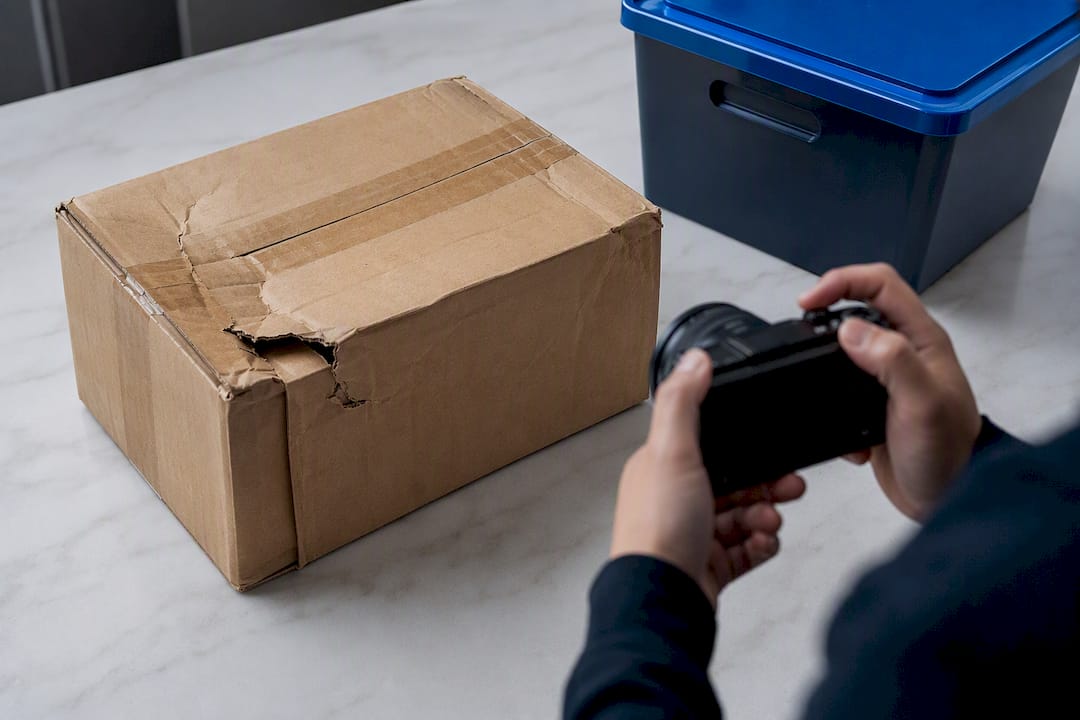
A carrier vehicle blocking access, a driver who won’t follow the posted SOP, or a package too hazardous to store indoors (a leaking container, for instance) all need an escalation path that doesn’t depend on whoever happens to be at the desk that day. Build a short decision tree: contact the carrier’s dispatch, notify the property manager, and document everything with a timestamp. The goal isn’t preventing every exception. It’s making sure exceptions don’t turn into unresolved disputes three weeks later.
Connecting Carrier Check-In to Your Property Software
A check-in process that lives only on paper or in a standalone locker app creates a second set of records nobody reconciles. The stronger setup ties carrier intake directly into whatever property management platform already tracks units, residents, and leases.
When a package gets logged at intake, the notification should pull the resident’s current contact info straight from the property management system, not a separate spreadsheet that goes stale the moment someone moves out or changes their number. That single connection point eliminates the single biggest cause of “we texted the wrong person” complaints.
Locker and package room hardware from different vendors handle this integration differently, some with open APIs that sync in real time, others requiring manual exports. If you’re evaluating new hardware, ask specifically how delivery logs export and whether they can feed into your existing resident communication system automatically. A system that requires someone to manually cross-reference two platforms every day defeats the purpose of automating intake in the first place.
For properties running an on-site Package Manager rather than a fully automated locker wall, this integration question matters less on the hardware side and more on the reporting side: can the manager pull volume and pickup-rate data into a format your regional team already reviews?
Data Privacy and Compliance for Carrier Information
Every scan at the intake desk captures a small pile of personal data: a resident’s name, unit number, and sometimes phone number or email tied to a tracking number. That data needs the same basic handling discipline as any other resident record your property keeps.
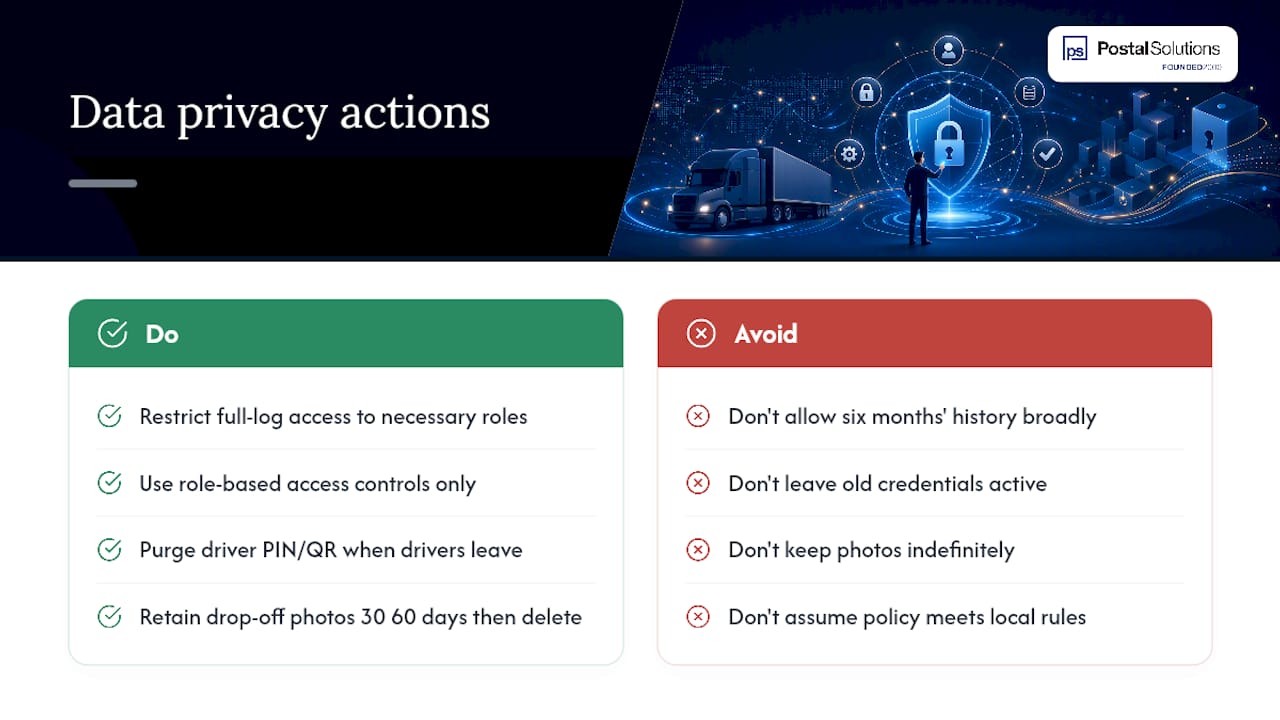
Limit who can access the full log history. An intake handler needs to see today’s deliveries, not six months of resident delivery patterns going back to move-in. Role-based access, where staff only see what their job requires, cuts down the exposure if a login gets compromised or a former employee’s access isn’t revoked promptly.
Carrier-side data matters too. If your system issues PIN or QR credentials tied to individual drivers, that’s identifying information about a third party, not just your resident. Store it with the same retention discipline as resident data, and purge credentials for drivers who’ve left their route rather than letting old codes sit active indefinitely.
Photo evidence taken at drop-off, while useful for dispute resolution, should be retained on a defined schedule rather than kept forever. A 30 to 60 day retention window covers the vast majority of legitimate disputes without turning your camera system into an indefinite surveillance archive of who received what. If your property operates in a jurisdiction with specific data retention or notification rules, that policy should be reviewed against local requirements rather than assumed.
Best Practices for Verifying Carrier Identity
Verifying who’s actually standing at your package room door is the step most properties skimp on, right up until it causes a problem.
For regular-route drivers, the first delivery matters most. Confirm the person matches the carrier’s uniform, vehicle branding, and, where your system supports it, cross-reference against the carrier’s known driver ID before issuing a PIN or QR credential. After that first verified interaction, ongoing check-ins can move faster since the credential itself becomes the ongoing proof.
For one-off or unfamiliar carriers, a video intercom step that requires the driver to state their carrier company and show a company badge or vehicle marking on camera before the door releases adds a verification layer without slowing down your regular routes. Staff reviewing the footage don’t need to be experts. They just need a consistent checklist: uniform, vehicle, stated company name, tracking number visible on the package.
Never grant standing access based on a single unverified claim of employment. A driver who says “I’m from FedEx” without any corroborating detail should go through the same verification as a stranger, regardless of how routine the request sounds. The properties that get burned on this usually skipped verification because the person “seemed legitimate,” which is exactly the assumption bad actors count on.
Metrics That Actually Tell You the Process Is Working
Four numbers tell you almost everything about whether your carrier check-in process is healthy or quietly breaking down.
Time-to-log measures how long between a package physically arriving and it’s showing up in the system. A number creeping upward usually means a bottleneck at intake, either understaffing or a scanner that’s slowing people down.
Pickup rate within the stated window shows whether your notification and pickup-window policy is actually working. If a growing share of packages sit past the window, either the notifications aren’t landing or the window itself needs adjusting.
Overflow incidents per week flags capacity problems before they become resident complaints. A steady rise means your locker or shelf capacity hasn’t kept pace with delivery volume, a common gap during a leasing surge.
Carrier compliance rate, tracked as scanned deliveries versus estimated total volume by carrier, catches the noncompliance problem before it becomes chronic. Review all four weekly, not monthly. Package volume shifts fast, and monthly reviews catch problems a full cycle too late.
How On-Site Package Management Fits the Bigger Leasing Picture
A package room that runs itself well stops being a cost center and starts showing up on tours as proof that life here is easier. That’s the shift we’ve watched happen across 25-plus years of daily, on-site package management: once intake, logging, and notification run reliably every day, leasing staff stop fielding “where’s my package” questions and start using the room as a selling point.
The teams that get the most out of this aren’t chasing perfect technology. They’re chasing consistency: someone on-site, most days of the week, following the same SOP every single time.
If your leasing desk is still the default escalation point for every missed delivery, that’s usually a staffing gap, not a system failure. Fixing the workflow on paper only gets you partway there.
— Postal Solutions
Get Daily Carrier Check-In Handled Without Adding to Your Leasing Team’s Plate
A dedicated on-site Package Manager can work your community up to six days a week, running the intake, logging, notification, and overflow process described above so your leasing staff never has to own it.
The service works whether your property runs electronic lockers, a staffed package room, or no locker system at all. Deliveries get received, scanned, sorted, and logged with a time-stamped audit trail, residents get notified automatically, and oversized or perishable items get handled under a documented exception process instead of an improvised one. Peak periods like move-in and the holiday surge get covered without your team scrambling for temporary help.
If you want a closer look at what a managed package room actually solves for your specific property, request a property assessment or grab the free package room management guide for SOP templates you can put to use this week.
Sources
- A Framework for Solving Multifamily’s Package Management Problem | Insights by Blueprint
- From Boxes to Competitive Edge: Best Practices for Multifamily Package Management
- Mailroom Management Best Practices | Smart Package Room
- How to Solve Carrier Compliance Issues for Multifamily Deliveries
FAQ
What is the first step in a carrier check-in process?
The driver arrives at a marked staging point and authenticates through a PIN, QR code, or intercom before the package moves to scanning and storage.
How long should a resident pickup window be?
A three to five day window with automated reminders at 48 and 96 hours keeps turnover steady without requiring staff to chase residents down, according to industry mailroom guidance.
What should a carrier check-in log record at minimum?
Timestamp, carrier name, tracking number, staff handler, and storage location, with a photo added whenever the hardware supports it.
How do you stop carriers from skipping the scan step?
Post a pictorial SOP at the delivery point, issue PIN or QR credentials to regular drivers, and run monthly audits comparing expected volume to logged scans, a combination that improves compliance according to carrier-behavior research.
Can outsourcing package management fix a broken check-in process?
Yes. An on-site Package Manager from a service like Postal Solutions takes over daily intake, logging, and notification, which removes the operational burden from leasing staff entirely.
Recommended
Ready when you are
Fix your package room — start with a free proposal
Daily on-site Package Manager, resident text & email pings*, and a tour-ready amenity. Tell us your unit count and we'll send a right-sized proposal — usually within one business day.
- ✓ 16–30 hours back every week
- ✓ Works with any locker system
- ✓ Faster, friction-free resident pickup
- ✓ An easy ancillary income addition