
August 21, 2026
The 9 Package Room KPIs Every Property Manager Should Track
Discover the 9 essential KPIs for monitoring your package room's efficiency. Optimize operations and boost resident satisfaction today.

Nine numbers tell you whether your package room is working: pickup rate, dwell time, throughput, locker or shelf utilization, overflow rate, loss and theft rate, notification delivery success, staff time saved, and chain-of-custody audit completeness. Track those, and you catch a carrier problem or a staffing gap before it becomes a resident complaint. The National Apartment Association consistently ranks package handling among the top resident satisfaction drivers, and a documented chain-of-custody process backs up every dispute you’ll ever have to settle. Here’s what to measure, starting today:
- Pickup rate — percent of packages collected within your target window
- Dwell time — average days a package sits before pickup
- Throughput — packages processed per staff hour
- Locker/shelf utilization — occupied capacity vs. available capacity
- Overflow rate — packages that don’t fit standard storage
- Loss/theft rate — missing or misdelivered packages per 1,000 deliveries
- Notification success — percent of alerts residents actually receive
- Staff time saved — hours reclaimed from manual sorting and follow-up
- Audit/chain-of-custody completeness — percent of packages with a clean log from intake to pickup
Key Takeaways
Package room performance improves when property teams track a defined set of KPIs weekly, pair automated logs with physical audits, and assign clear ownership for corrective action.
| Point | Details |
|---|---|
| Track nine core KPIs | Pickup rate, dwell time, throughput, utilization, overflow, loss/theft, notification success, staff time saved, audit completeness. |
| Pair automation with audits | API pulls handle daily volume; weekly physical audits catch what digital logs miss. |
| Set green/amber/red thresholds | Healthy properties typically have high pickup rates and notification success rates. |
| Assign KPI ownership | Package Manager owns daily and weekly metrics; asset manager reviews monthly trends. |
| Consider on-site management | Package Room Management from Postal Solutions pairs daily audits with staff feedback loops to catch issues before residents complain. |
Table of Contents
- What Are the Core Package Room KPIs and How Do You Calculate Them?
- Where Should You Pull KPI Data From?
- What Package Room Benchmarks Should You Target?
- Who Owns Each KPI and How Do You Act on It?
- How Postal Solutions Applies These KPIs on the Ground
- How Do You Catch Problems Before Residents Complain?
- What I’d Do First for a 200-Unit Property
- Get Hands-On Help Measuring Your Package Room
- Further Reading and Tools
- FAQ
What Are the Core Package Room KPIs and How Do You Calculate Them?
Each of these metrics answers a specific operational question. Get the formula wrong and you’ll chase the wrong problem for months.
Package volume (throughput) counts total packages received in a period, typically daily and rolled into a weekly total. It’s your baseline for staffing math: a property receiving 400 packages a week needs a different labor plan than one receiving 150. Track it daily; review trends weekly.
Intake processing time measures the average time from carrier drop-off to shelf placement, in minutes per package. Formula: total intake minutes ÷ packages received. A property manager’s guide to package room management puts sustainable processing time at under three minutes per package for most mid-size communities. If that number creeps past five minutes, you likely have a sorting layout problem, not a staffing problem.
Pickup rate is the percent of packages collected within your target window, usually 48 or 72 hours. Formula: (packages picked up within window ÷ total packages delivered) × 100. This is the number residents feel most directly. A low pickup rate almost always traces back to notification failures rather than resident apathy.
Dwell time is the average number of days a package remains in the system before pickup. Formula: sum of days each package sat, divided by total packages. Dwell time and pickup rate move together, but dwell time catches the slow-burn cases pickup rate misses, like the resident who’s traveling for two weeks.
Locker or shelf utilization compares occupied capacity to total available capacity at a snapshot in time, expressed as a percentage. Measure it weekly, and at peak moments during move-in season.
Overflow/exception rate tracks packages that don’t fit standard storage, whether oversized furniture boxes, refrigerated grocery deliveries, or items requiring special handling. Formula: (exception packages ÷ total packages) × 100. A package sorting system with a dedicated oversized zone keeps this number from becoming a hallway pileup.
Loss, theft, and misdelivery rate is calculated per 1,000 deliveries to normalize across property sizes: (lost or misdelivered packages ÷ total deliveries) × 1,000. This is the metric residents remember longest, and the one insurance and legal teams ask about first.
Notification delivery success measures the percent of resident alerts that actually land, whether by text or email. Formula: (successful notifications ÷ total notifications sent) × 100. Logging the exact delivery timestamp, notification timestamp, and delivery method is what lets you separate a system failure from a resident who ignores texts.
Staff time saved compares hours spent on package handling before and after a process change, tracked weekly in labor hours.
Audit and chain-of-custody completeness is the percent of packages with an unbroken log from carrier scan to resident pickup, verified through weekly physical audits.
Pro Tip: Run pickup rate and notification success side by side on the same weekly report. When notification success is high but pickup rate is low, the problem isn’t your alert system. It’s the pickup window or resident habits, and no amount of new software fixes that.
Where Should You Pull KPI Data From?
Reliable numbers come from combining automated logs with human checks. Your primary sources: locker or shelf system logs, access-control logs, courier scan data from mobile kiosk intake, staff intake logs, resident notification records, amenity billing data if the package room is a paid service, weekly physical audits, and resident survey feedback.
API pulls and scheduled exports handle the daily heavy lifting for volume, processing time, and notification logs. Webhook notifications can flag failed alerts in real time instead of waiting for a weekly report. Manual audits stay necessary for chain-of-custody verification and mismatch investigations. No automated system catches every discrepancy between what a carrier scanned and what actually landed on the shelf.
Three pitfalls trip up most properties:
- Time-zone mismatches between courier scan timestamps and your local system clock, which throw off dwell-time math
- Duplicate records when a package gets scanned twice by different carrier workflows
- Label capture errors from damaged or poorly printed barcodes, which create false “missing” entries
A weekly export worth building includes: date range, total volume, pickup rate, average dwell time, utilization percent, overflow count, notification success rate, and open chain-of-custody exceptions.
What Package Room Benchmarks Should You Target?
Numbers only matter against a target. A 200-unit garden-style property and a 400-unit high-rise with concierge staff need different thresholds, and peak season (move-in months and the holiday quarter) should shift every target loosely upward for a defined window rather than resetting your baseline.
Cross into amber territory and it’s worth watching closely. Hit red and it’s time to act.
During move-in season or the holiday quarter, treat volume as a separate stress test. High-performing properties pre-stage overflow plans and temporary staffing rather than waiting for the amber threshold to hit mid-surge.
Who Owns Each KPI and How Do You Act on It?
KPIs without an owner turn into spreadsheets nobody opens. Assign each metric to a role, set a review cadence, and build the corrective playbook before you need it.
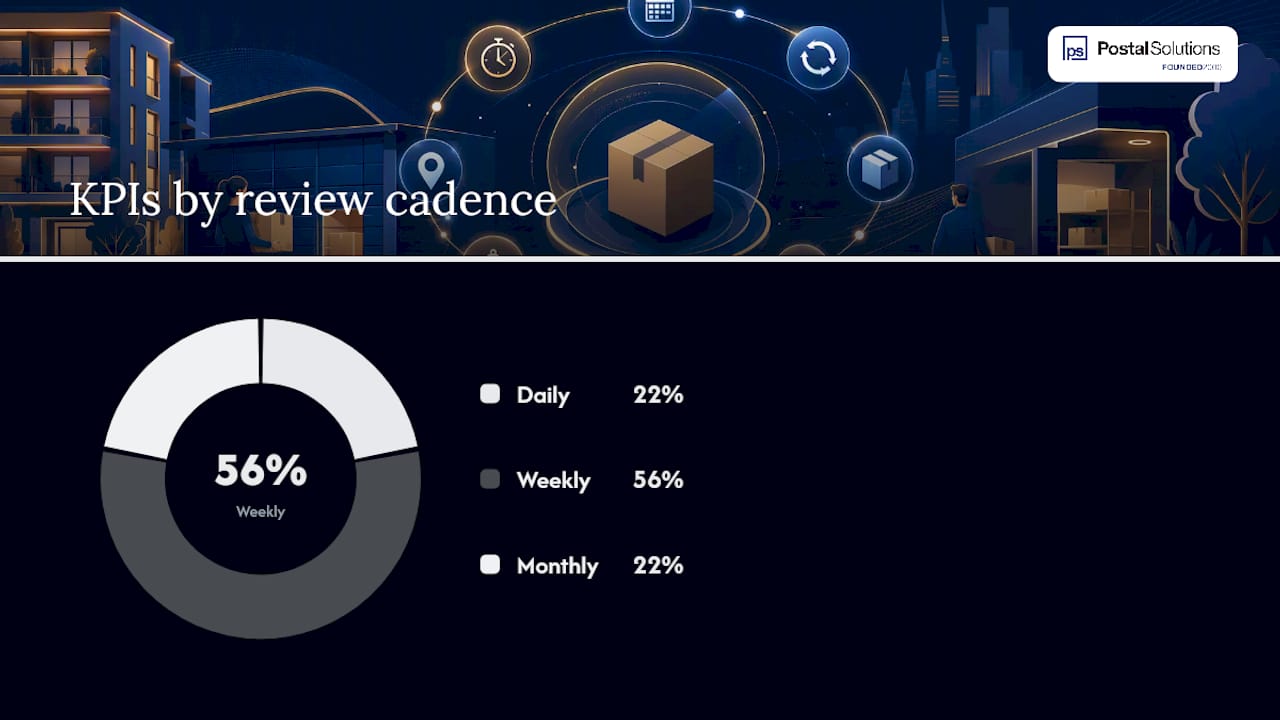
Daily metrics (throughput, processing time) belong to the on-site Package Manager. Weekly metrics (pickup rate, dwell time, utilization, notification success, audit completeness) get reviewed by the Package Manager with the property manager. Monthly metrics (loss/theft rate, staff time saved) roll up to the asset manager for trend analysis.
| Cadence | KPI examples | Owner |
|---|---|---|
| Daily | Throughput, processing time | Package Manager |
| Weekly | Pickup rate, dwell time, utilization, notification success | Package Manager + property manager |
| Monthly | Loss/theft rate, staff time saved | Asset manager |
When a KPI drifts amber or red, the fix is usually one of these: rebalance shelving, open an overflow staging area, push a resident reminder campaign, add surge staffing for a known peak window, or tighten the pickup-window policy.
Pro Tip: Keep your audit log to five fields: package ID, carrier, intake time, pickup time, and staff initials. A 20-field audit form looks thorough on paper and gets abandoned by week three.
How Postal Solutions Applies These KPIs on the Ground
Digital logs tell you what happened. They don’t always tell you why. Postal Solutions runs weekly physical audits alongside daily intake logs specifically because a staffed check catches things a locker system’s dashboard can’t, like a carrier consistently mis-scanning one building’s packages or a shelf zone that’s quietly running out of room three days before the utilization report would flag it.
That combination shows up in outcomes property teams notice fast:
- Leasing staff get hours back weekly, no longer sorting boxes or chasing lost deliveries
- Misdeliveries drop when a dedicated Package Manager owns chain-of-custody instead of splitting it across rotating leasing staff
- Resident pickup times shorten once notification timestamps get audited against actual pickup timestamps, not just sent counts
The gap between “notification sent” and “notification received and acted on” is where most package room complaints actually originate. Closing it takes a person checking the log, not just a system generating one.
Properties working with Postal Solutions can request a downloadable guide that walks through setting these KPIs up property by property.
How Do You Catch Problems Before Residents Complain?
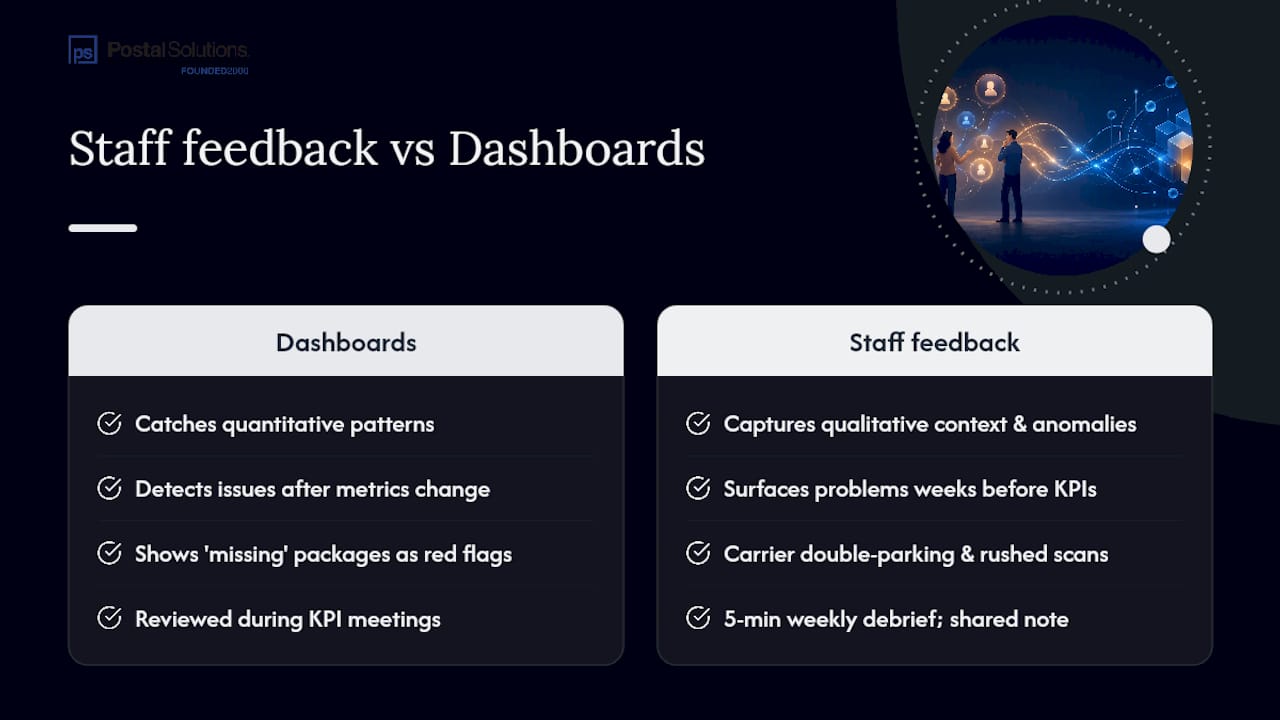
Digital dashboards catch patterns. Staff catch context. It won’t tell you that the same carrier has been double-parking and rushing scans every Tuesday afternoon, creating the exact intake errors that show up as “missing” packages three days later.
That’s the gap a staff-driven feedback loop closes. When your on-site Package Manager logs qualitative notes alongside the numbers, patterns surface before they hit your KPI dashboard as a red flag. A recurring carrier mismatch, a resident who consistently can’t find their unit’s shelf zone, a shipment type that keeps triggering overflow because nobody adjusted the layout for it, these show up in staff observations weeks before they’d move a monthly loss/theft rate enough to notice.
Build this into your weekly cadence with one simple habit: a five-minute staff debrief alongside the KPI review, where the Package Manager flags anything that felt off even if the numbers looked fine. Document it in a shared note, not a formal report. The goal isn’t more paperwork. It’s catching the carrier who’s been shorting your building on scans before that shows up as a theft-rate spike, or noticing that one floor’s residents consistently miss notifications before that shows up as a pickup-rate dip.
Industry practitioners increasingly treat this as non-negotiable precisely because digital systems, however good, measure what already happened. Staff observation catches what’s about to happen.
What I’d Do First for a 200-Unit Property
If I inherited a 200-unit package room tomorrow, I’d run a 7-day intake audit, turn on notification delivery logs, set a firm pickup-window policy, assign an owner to each KPI, and put a 15-minute weekly review on the calendar. Fix chain-of-custody and notification reliability before spending a dollar on new hardware. Most package room complaints trace back to process gaps, not equipment.
Get Hands-On Help Measuring Your Package Room
Building this tracking system from scratch takes time most leasing teams don’t have between showings, renewals, and everything else on their plate. Postal Solutions built its entire operating model around exactly this problem: a dedicated on-site Package Manager who runs the intake, sorting, notifications, and weekly audits, so your team isn’t the one pulling KPI reports at 6 PM.
If you want a starting point, the free Package Room Management for Apartments guide includes the KPI templates and audit checklists this article walks through, ready to adapt to your property’s unit count and package volume. For properties ready to hand off daily package operations entirely, see how on-site package room management works for communities your size. Download the guide, or reach out to request a customized KPI dashboard export built around your property’s actual delivery volume.
Further Reading and Tools
- Package Room Management for Apartments: full KPI definitions and setup advice
- Free Package Room Management Guide: downloadable templates and dashboards
- Package Security for Multifamily Communities: audit and chain-of-custody checklists
- Package Room Management services: explore on-site management options
FAQ
What Is the Most Important Package Room KPI to Track First?
Pickup rate and notification success together, since a low pickup rate almost always traces back to a notification failure rather than resident behavior.
How Often Should You Review Package Room KPIs?
Review throughput and processing time daily, review pickup rate, dwell time, and utilization weekly, and roll loss/theft rate and staff time saved into a monthly report.
What Counts as a Good Pickup Rate for an Apartment Package Room?
Can On-Site Package Room Management Improve These KPIs?
Yes. Postal Solutions pairs daily digital logging with weekly physical audits and staff-driven observation, which catches chain-of-custody gaps and carrier patterns before they show up as resident complaints.
What’s the Difference Between Dwell Time and Pickup Rate?
Pickup rate measures the percent of packages collected within a target window, while dwell time measures the average number of days a package sits before pickup, catching slow cases pickup rate alone can miss.
Recommended
- Package Room Reviews: What Property Managers Should Check — Postal Solutions Blog
- Resident Package Management for Property Managers: A Practical Guide — Postal Solutions Blog
- Ancillary Income Property Management: 2026 Guide — Postal Solutions Blog
- Give Your Leasing Team Hours Back | Postal Solutions
Ready when you are
Fix your package room — start with a free proposal
Daily on-site Package Manager, resident text & email pings*, and a tour-ready amenity. Tell us your unit count and we'll send a right-sized proposal — usually within one business day.
- ✓ 10–20+ hours back every week
- ✓ Works with any locker system
- ✓ Faster, friction-free resident pickup
- ✓ An easy ancillary income addition